
Review liquidity and availability
Classify recorded assets, identify distinct excluded portions, and save a reviewed availability worksheet.
- Who can do this
- Owners, or people with View Nonprofit reports; saving a version needs Review liquidity worksheet versions
- Where
- Nonprofit, then Nonprofit reports
- You'll need
- Approved mappings, an active Operating fund and an accessible active or trial Nonprofit subscription
On this page
Review a version
- Under Nonprofit, open Reports, then Liquidity and availability worksheet.
- Set As of. A date without a review links to the latest review and start a new review.
- Select New review on an existing worksheet.
- Confirm As of and Available by, which must be after the report date and within one year.
- Choose Financial asset or Nonfinancial asset for every listed account and fund balance.
- Use Add an amount for each excluded portion, then choose its reason and amount. Starts are stacked within each account and fund automatically.
- Use Add supporting file to upload a PDF, JPG, or PNG up to 10 MB. At least one supporting file is required.
- Select Save review. The reviewer comes from your signed-in account.
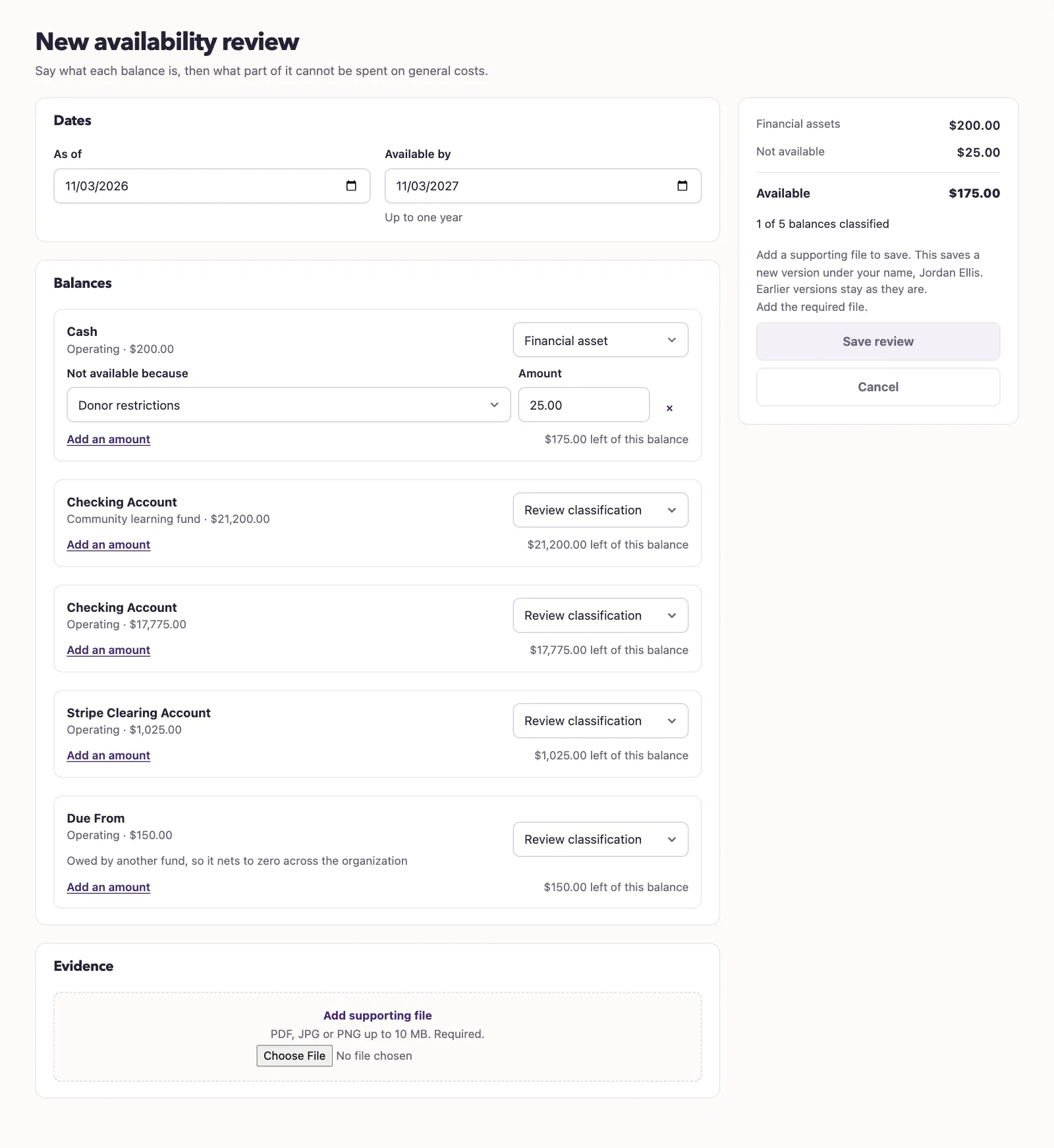
The summary shows financial assets, excluded amounts, and availability. Amounts must stay within the reviewed financial balance. QixCount rejects overlapping portions, missing classifications, and negative asset balances. A date without asset balances cannot be saved through this form.
An interfund Due From balance is labeled as owed by another fund and nets to zero across the organization. Review its availability before classifying it.
What happens next
QixCount saves a numbered snapshot with the reviewer, evidence references, source balances, exclusions, and available amount. The result shows total, nonfinancial, and financial assets, excluded portions, and availability. Availability equals financial assets less exclusions.
The worksheet covers the whole business and rejects dimension filters. A date without a saved version cannot be exported. Select Download PDF or Download CSV after saving. Later ledger changes do not rewrite the saved snapshot.
Next, review the statement of financial position.
Good to know
The Liquidity and availability worksheet saves your reviewed asset classifications and exclusions. You need View Nonprofit reports permission to open it and Review liquidity worksheet versions permission to save a version. Account mappings must be approved, the Operating fund must be active, and the business needs an accessible active or trial Nonprofit subscription.