
Generate and send a cash acknowledgment
Generate a versioned PDF, preview or download it, and explicitly send it to the saved donor email.
- Who can do this
- Owners, or people with View cash gifts; generating needs Generate acknowledgments; sending needs acknowledgment view and send access
- Where
- Nonprofit, then Cash gifts
- You'll need
- A posted gift, confirmed current legal identity and a named donor; approved mappings, an active Operating fund and Nonprofit subscription access
On this page
Generate and review a letter
- Under Nonprofit, select Cash gifts.
- Select the gift row to open its receipt.
- Select Generate acknowledgment under Acknowledgment when no letter exists.
- Select Preview on the new version to open its PDF.
- Select Download if you want a copy.
Who can do this and what you need
Generate a stored PDF acknowledgment for a posted cash gift. Generation and sending are separate actions.
You need View cash gifts to open the gift, Generate acknowledgments to issue a version, and View acknowledgments to preview or download one. Sending requires both Send acknowledgments and View acknowledgments. The business needs approved mappings and an active Operating fund.
Confirm legal identity. QixCount checks that the confirmed details still match current settings. The donor needs a name; sending also needs a valid email saved in that acknowledgment version.
If identity is unconfirmed, the warning links to Open Organization profile when you have identity-review permission. Generation becomes available after confirmation.
Send or replace a version
- Review the version's PDF with Preview.
- Select its Send version button, which includes the version number.
- Review the delivery result beneath that version before retrying a failed send.
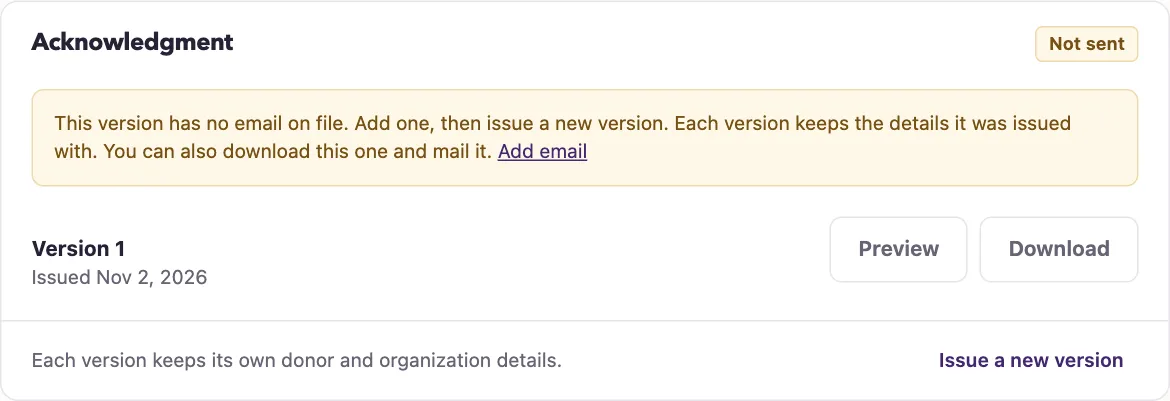
Sending emails that PDF to its saved recipient. Editing the contact does not change earlier versions. If the email is missing or wrong, correct the contact first, then select Issue a new version. Add email appears when your contact or donor access allows that path.
Download unsent letters
On Cash gifts, select Download unsent letters when stored unsent letters match the current filters. It downloads a ZIP containing the latest PDF for up to 200 gifts, newest received first. It does not generate letters or send email.
Refunded gifts and gifts with any successfully sent version are excluded. Failed deliveries are eligible unless your selected filters exclude them. Gifts without a version are skipped; the page shows their count. The link requires acknowledgment viewing permission and at least one downloadable letter.
What happens next
Each numbered version retains its organization identity, donor details, received date, amount, and goods/services disclosure. Generation sends no email. Earlier PDFs stay unchanged after contact edits, identity changes, or refunds. A refunded gift offers no new letter or send action.
Next, record a full gift refund if the gift needs reversing.