
Review fund coding on transactions
Choose a fund, program, grant, restriction, net asset class, and function on a Nonprofit journal.
- Who can do this
- Owners; journal access needs View journal entries plus the permission for each create, edit or post action
- Where
- Books, then Journal entries
- You'll need
- Advanced accounting turned on in Features
On this page
Nonprofit transactions carry financial coding alongside their accounts and amounts.
Code a journal draft
- Under Books, open Journal entries.
- Select New Entry. On an empty list, the action is Create Entry.
- Enter Date, an optional Reference, and Description.
- Choose the Account and debit or credit amount for each line.
- Review each line's Financial coding using the fields below.
- Select Save as Draft. You return to the journal list.
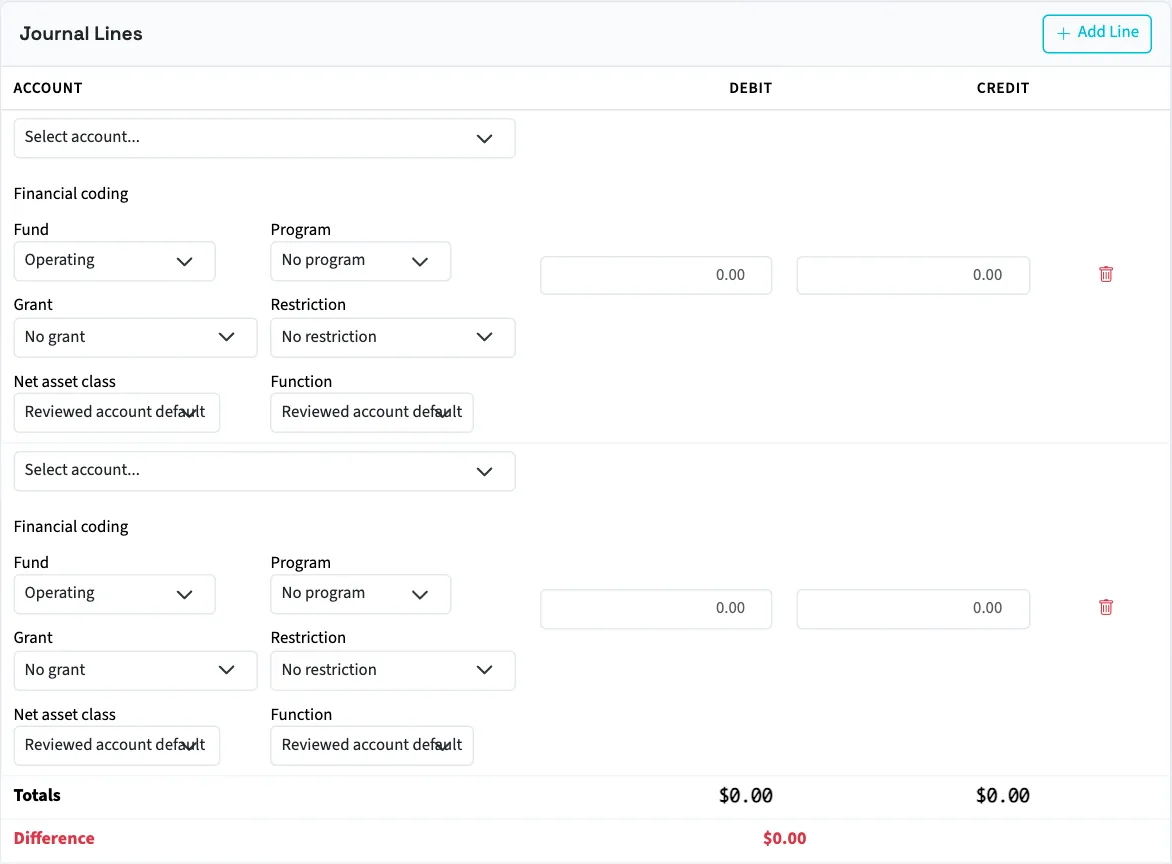
| Field | How QixCount uses it |
|---|---|
| Fund | Defaults to Operating when omitted; must be active for ordinary new coding |
| Program | Optional activity identifier |
| Grant | Optional grant identifier; its workflow can impose extra posting checks |
| Restriction | Optional donor restriction identifier |
| Net asset class | For revenue, equity, and expense accounts, uses a reviewed default when available; otherwise defaults to without donor restrictions |
| Function | Required by QixCount for expense posting; can come from the reviewed expense-account default |
In QixCount, expense lines use the class without donor restrictions. All selected records must belong to the business and be active for ordinary posting. A label showing an archived item is a reminder to reactivate it, not permission to post with it.
If saving fails, review and re-enter the lines before retrying. The creation form rebuilds two blank lines after a validation error. To change a saved draft, open it, select Edit, update its lines, and select Save Changes.
Before posting
The journal needs at least two submitted lines and must balance overall before saving; each line can have a debit or a credit, never both. It must also balance by fund before posting. Use interfund offsets when an ordinary draft balances overall but not by fund.
Posting requires approved mappings, an active Operating fund, and an accessible active or trial Nonprofit subscription. Fiscal-period status and backdating settings are checked again when posting. Posted journal lines cannot be edited.
Next, review a fund trial balance.
Good to know
Review each line, including cash and control-account lines.
You need View journal entries permission to follow the list and detail screens, Create journal entries permission to add a draft, Edit draft entries permission to change it, and Post journal entries permission to post it. If the sidebar link is hidden, someone with Manage business settings, roles & permissions permission can enable Advanced accounting under Settings, Features.