
Find and manage vendors
Find vendors, review their balances, and understand active and approval statuses.
- Who can do this
- Owners, or people with View vendors
- Where
- Purchases, then Vendors
On this page
Vendors are the people and businesses you buy from. Open Purchases, then Vendors to find their records. Owners and people with View vendors can use this page. Adding, editing, and deleting require separate permissions.
Find a vendor
- Enter a name, company name, email address, or phone number in Search.
- Choose Status, 1099 Tracking, or Payment Terms filters as needed.
- Select Filter.
- Select the vendor's name to open the profile.
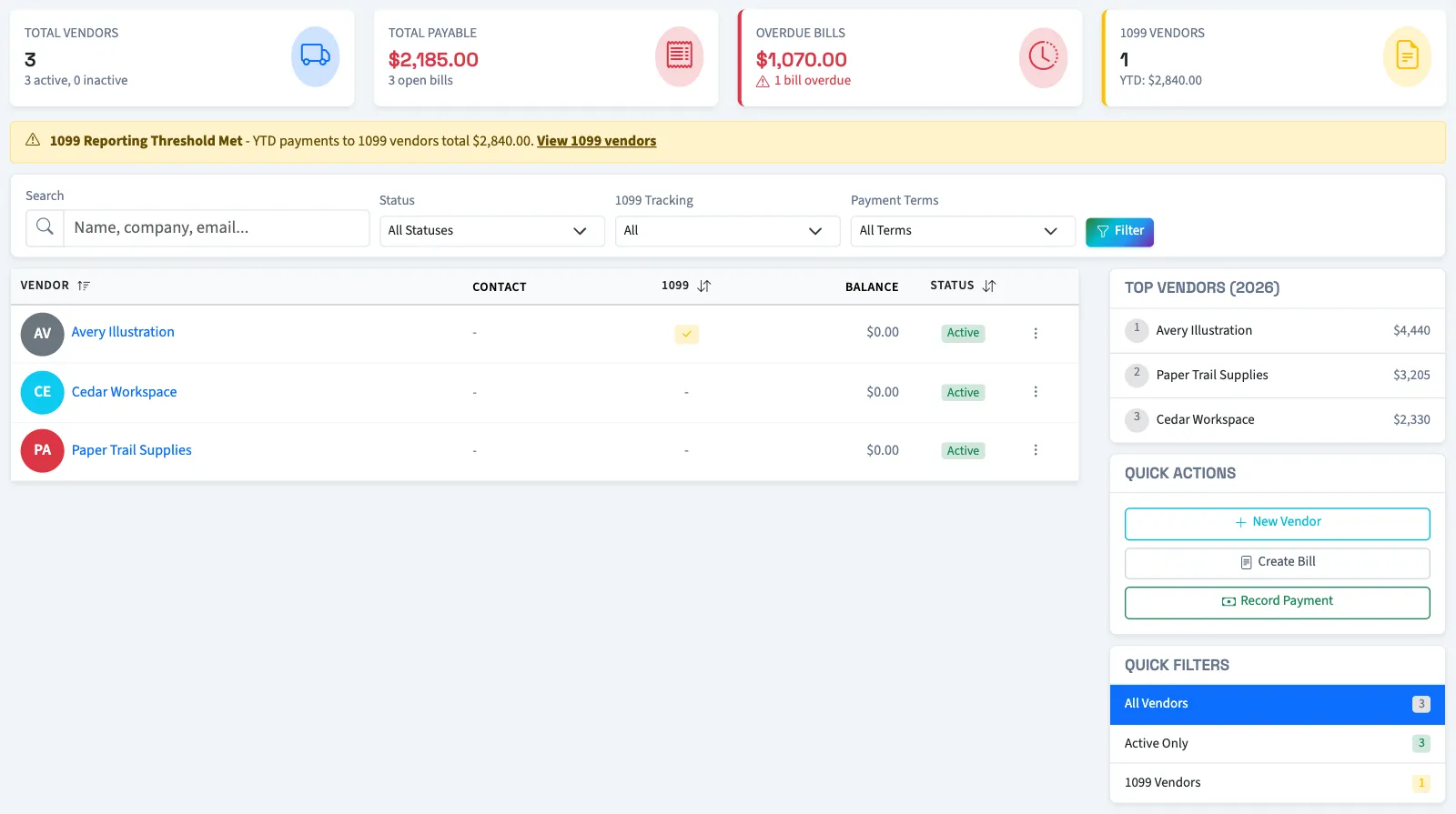
The summary cards show business-wide totals. They do not change with the list filters. The list shows 25 vendors per page.
Understand vendor availability
| State | What it means |
|---|---|
| Active | The vendor is marked active. Bill and payment selection also requires approval. |
| Inactive | The vendor is excluded from the active vendor choices. |
| Pending approval | The new vendor needs approval before appearing in bill and payment searches. |
| Rejected | The approval request was rejected and the vendor is inactive. |
If no records match, clear the filters before adding another vendor.
Next, add or edit a vendor, or review a vendor's history.