
Use the bill inbox
Track uploaded vendor documents from extraction through review and linking to a bill.
- Who can do this
- Owners, or people with View bills; uploading and retrying need Create bills
- Where
- Purchases, then Bill inbox
On this page
The bill inbox holds uploaded vendor documents while Qix reads them for review. Uploading a document does not create or post a bill.
Open Purchases, then Bill inbox. The page title is Upload Bills. Owners and people with View bills can see documents. Uploading and retrying extraction require Create bills.
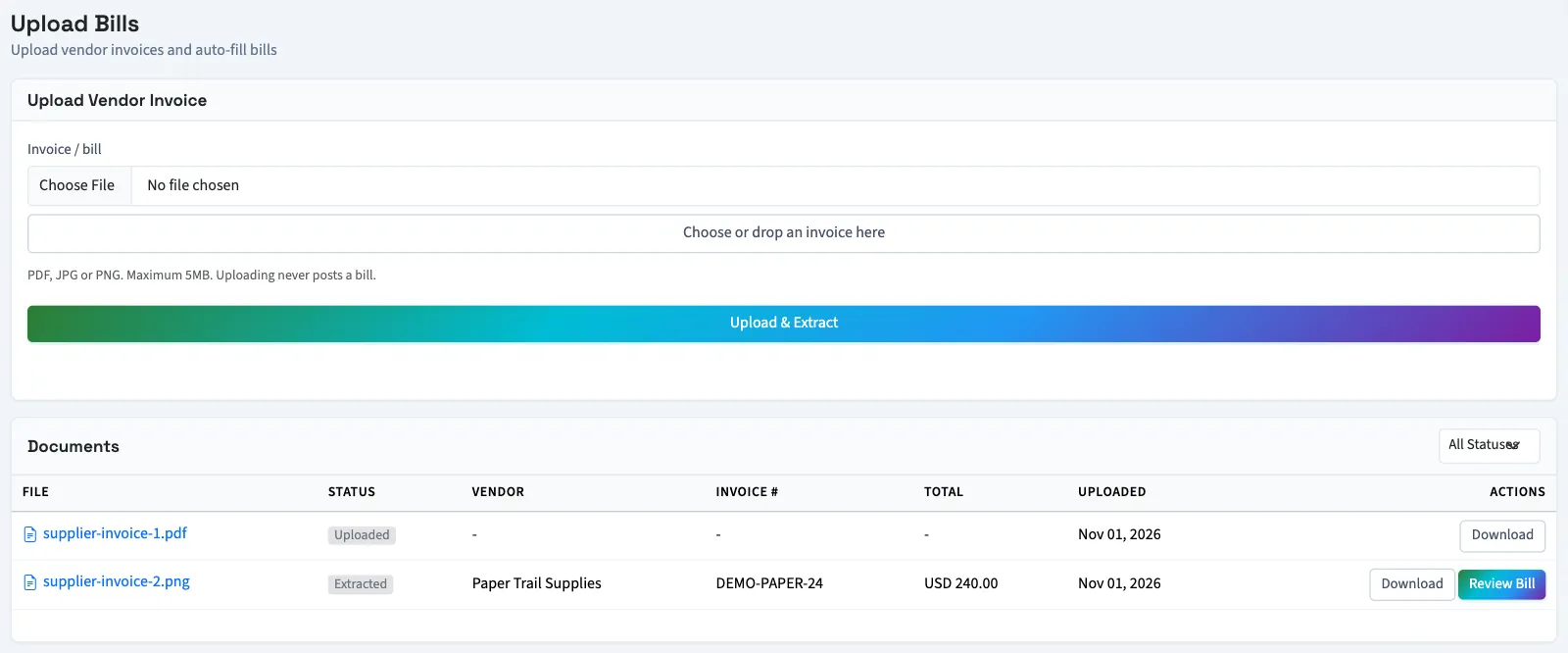
Understand the document status
| Status in the list | What it means |
|---|---|
| Queued | The file is waiting to be read. |
| Processing | Extraction is running. |
| Extracted | Extraction produced information ready for review. |
| Needs review | Extraction needs closer checking, such as a missing vendor or lower confidence. |
| Linked | The upload has been used for a saved bill. |
| Failed | Extraction did not finish successfully. Open the document for its message and retry option. |
Use All Statuses to narrow the document list. Select the filename to inspect the result, Download for the original, or Review Bill when that action appears. A linked item has View Bill instead.
The same file uploaded again reuses its existing inbox result. An upload linked to a bill cannot create another bill from that same inbox item.
Next, upload and review a bill, then turn the upload into a bill.