
Review payments made
Find vendor payment records and review their accounts, attachments, and bill allocations.
- Who can do this
- Owners, or people with View payments to vendors
- Where
- Purchases, then Payments made
On this page
Payments made lists recorded vendor payments, including payments created through a bulk payment batch. Owners and people with View payments to vendors can use it. These records track what was entered in QixCount; they do not confirm a bank transfer.
Find a payment
- Open Purchases, then Payments made.
- Choose Vendor, Method, From, or To filters as needed.
- Select Filter.
- Select the payment number.
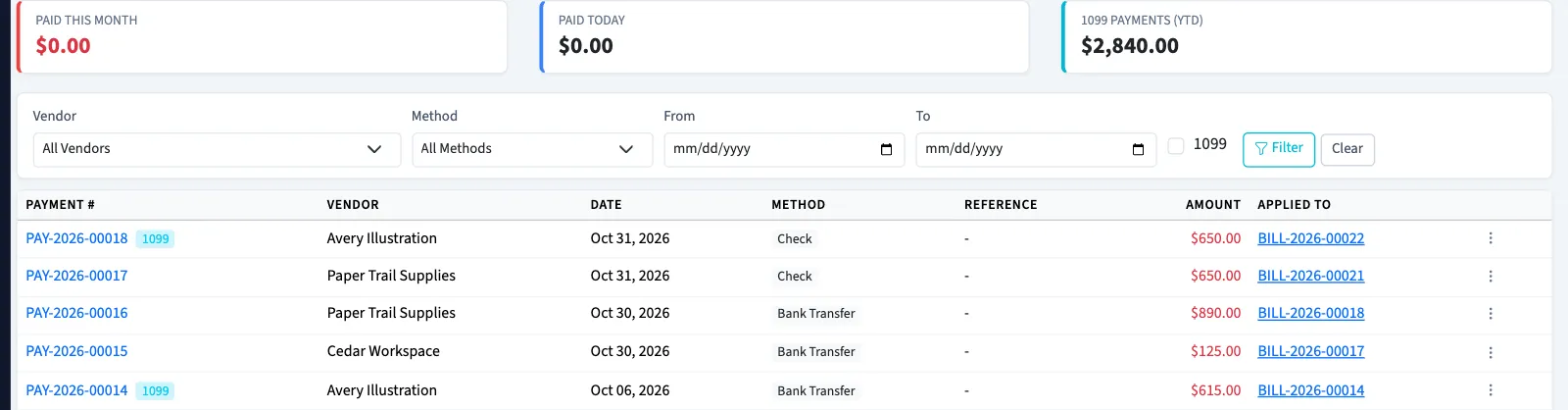
The list shows the payment amount, reference, and the bills it applies to. A Nonprofit payment that was voided remains visible with a voided marker. Use Clear to remove filters when a payment is missing from the list.
Review the record
The detail page shows Payment Details, Applied to Bills, and saved Attachments. Select a bill number to inspect the bill, or an attachment filename to download it. Each linked page requires its own viewing permission.
A General Ledger card appears when a journal entry is linked to the payment. A payment waiting for approval has not completed that posting.
The detail header currently shows Paid even for a record waiting for approval or a record that was voided. Check the approval request, the journal link, and any void information before treating that badge as confirmation.
There is no edit form for saved vendor payments. To correct one, delete or void the payment, then record the replacement after reviewing the affected bills.