
Record a cash gift
Post a donor's cash gift with reviewed contribution allocations and any separate exchange amount.
- Who can do this
- Owners, or people with Record cash gifts and View cash gifts
- Where
- Nonprofit, then Cash gifts
- You'll need
- Approved mappings, an active Operating fund, donor and contact, and an active cash/bank account; Nonprofit subscription access and an open posting date
On this page
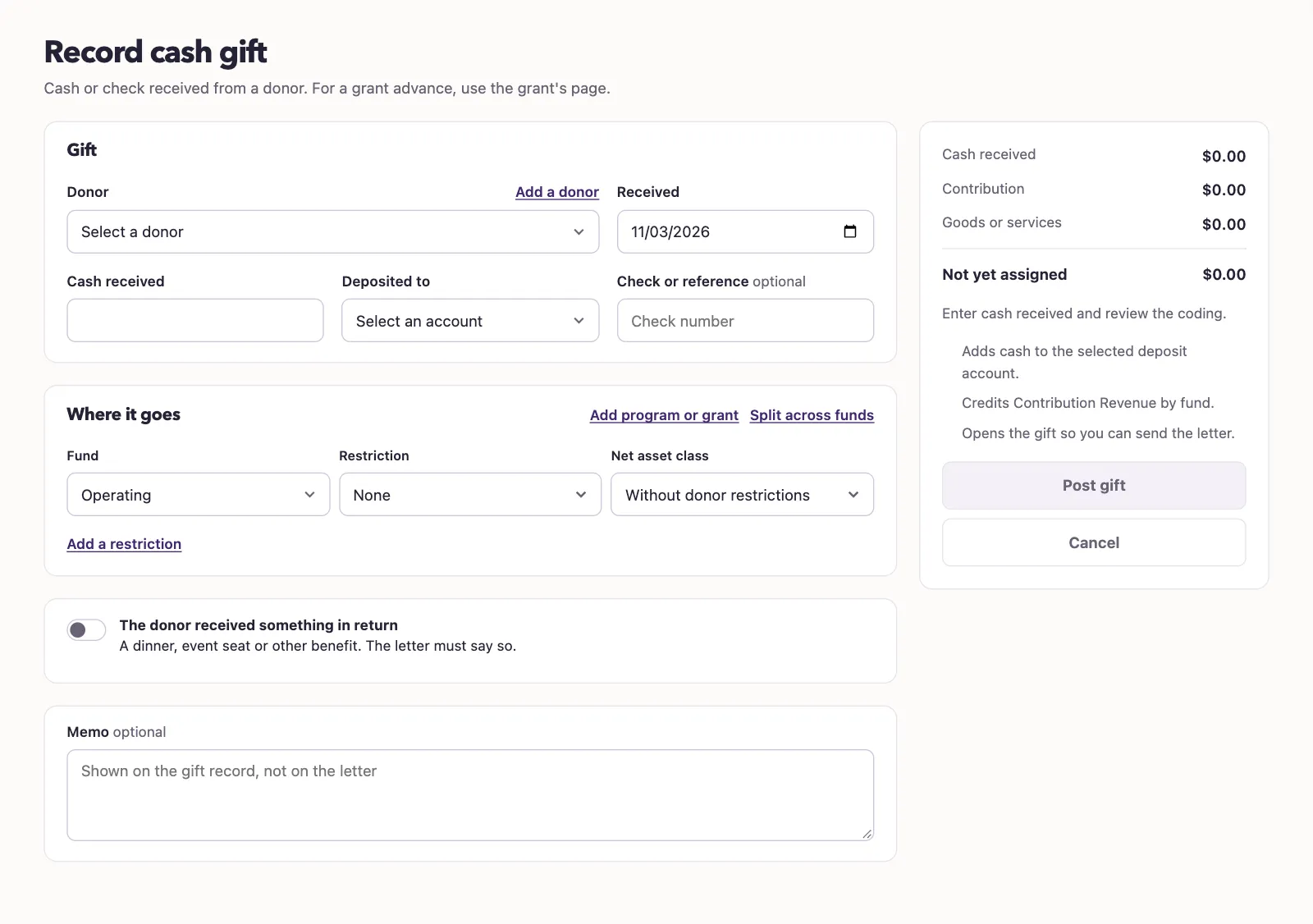
Enter the gift
- Under Nonprofit, select Cash gifts.
- Select Record cash gift.
- Select Donor.
- Enter Received.
- Enter Cash received.
- Select Deposited to. One available account is selected automatically; with several, select one.
- Enter Check or reference if you have one, or leave it blank.
- Review Fund, Restriction, and Net asset class under Where it goes.
- Select Add program or grant if you need those optional choices.
- Enter Memo if needed.
- Select Post gift after reviewing the summary.
Who can do this and what you need
Record cash or checks received from a donor. You need Record cash gifts, an active donor and contact, approved mappings, and an active Operating fund. Opening the list and saved gift also needs View cash gifts.
Find a gift
The list starts with the current calendar year, newest received first. Use Year, Status, Fund, and Acknowledgment to narrow it; on a phone, select Filters first. Select All under Year for older gifts. Searching without an explicit year searches all years. No reference appears when no visible reference is available.
Add a donor opens a panel when you have Manage donor profiles permission. Enter the new contact's name and optional email, mailing address, and notes, then select Add donor. Your gift entries stay in place. Add a restriction also opens a panel with its separate manage permission.
Allocate the contribution
A single line automatically receives cash less the exchange amount. Select Split across funds for separate amounts; positive contribution lines must total the contribution, with Not yet assigned at zero. Up to 100 contribution lines are accepted.
Selecting a restriction sets and locks the class to With donor restrictions. Without a restriction, you can select the class. See the coding glossary.
Amounts accept whole dollars, cents, commas, and a dollar sign. Cash received, each split, and the exchange amount can be up to $9,999,999,999,999.99. The good-faith disclosure value is separate and does not post to the books.
Include goods or services
Select The donor received something in return when applicable. Enter What they received and Good-faith value. Enter Exchange amount for the amount posted separately to exchange revenue. A positive exchange amount needs a separate active Revenue account. A split or restricted gift also needs its own exchange coding.
The letter's good-faith value and the posted exchange amount are separate values.
What happens next
Posting adds cash and contribution revenue, plus any exchange revenue, and opens the gift record. Gift details cannot be edited. Memo stays off the letter. Posting does not send an acknowledgment.
An unchanged retry of the same form returns the original gift. A reused reference with different details is rejected; enter another reference or leave it blank. Closed periods or posting settings can block posting. Conditional grant advances use the grant page.
Next, generate an acknowledgment.