
Approve Nonprofit account mappings
Review posting accounts and expense function defaults to make your Nonprofit business ready for posting.
- Who can do this
- Owners, or people with Review and approve Nonprofit account mappings
- Where
- Settings, then Nonprofit mapping
- You'll need
- An accessible active or trial Nonprofit subscription
On this page
Account mappings tell QixCount which accounts to use for Nonprofit posting. You need the Review and approve Nonprofit account mappings permission. You can open this setup screen before posting readiness is approved.
Review the mappings
- Open settings and select Nonprofit mapping under Accounting.
- Under Accounts, select an active account for each purpose.
- Under Expense functions, select a default function for every active expense account.
- Select Approve mappings before initial approval. After approval, change a value to reveal Approve changes.
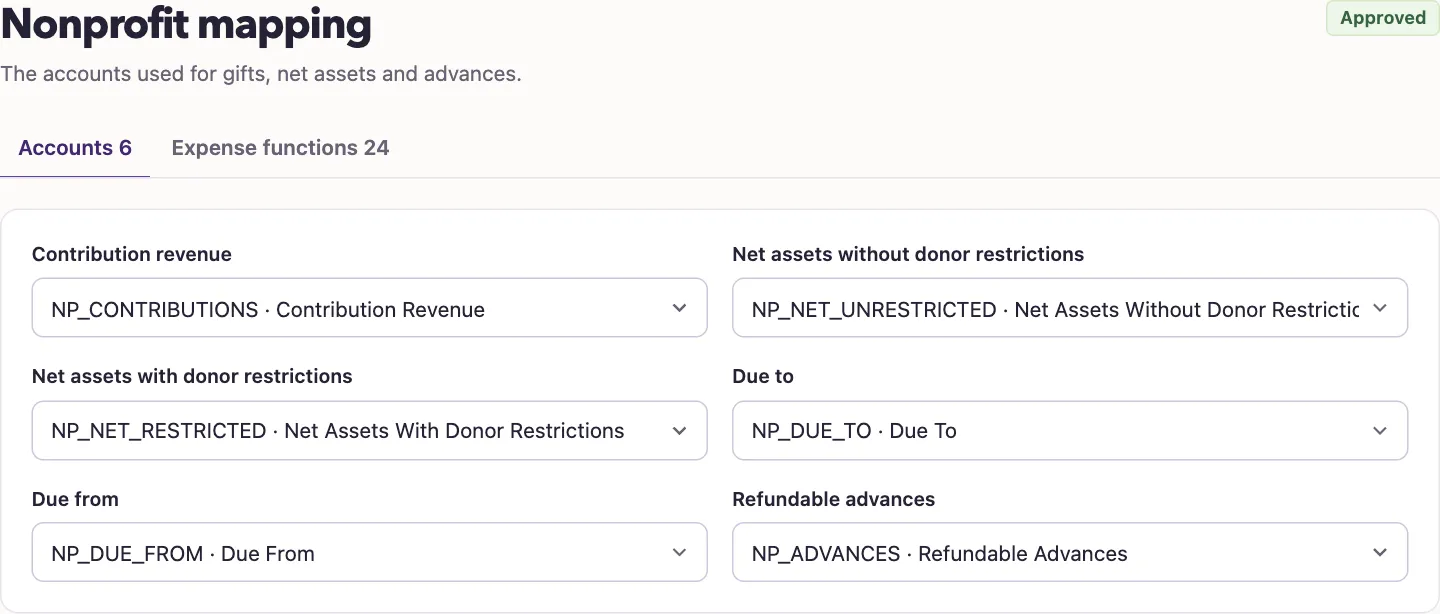
| Purpose | Account type QixCount accepts |
|---|---|
| Contribution revenue | Revenue |
| Net assets without donor restrictions | Equity |
| Net assets with donor restrictions | Equity, using a different account from the other net asset mapping |
| Due to | Liability |
| Due from | Asset |
| Refundable advances | Liability |
The page offers only active accounts of the matching type. QixCount also checks that the Operating fund is active and that the Nonprofit profile uses USD and accrual accounting.
What happens next
The status changes from Not approved yet to Approved. QixCount records the mapping review and uses the selected defaults when it normalizes transaction coding.
Approval does not replace other checks. A later archived posting account, missing expense default, inactive Operating fund, or inaccessible subscription can still block a transaction. Review the specific error instead of repeatedly submitting it.
Next, create funds and review financial coding.
Accounts and Expense functions are two tabs in one form. Use account search, the function filter, or Set visible accounts to work through expense defaults. Hidden rows stay in the saved mapping.