
Save a named grant classification review
Record your classification choice, reasoning, and supporting files before grant posting begins.
- Who can do this
- Owners, or people with View grants and Review grant classification and evidence
- Where
- Nonprofit, then Grants
- You'll need
- Approved mappings, an active Operating fund and Nonprofit subscription access; an active grant and grantor, an agreement and evidence, no posted funding
Save your review
- Open the award from Grants.
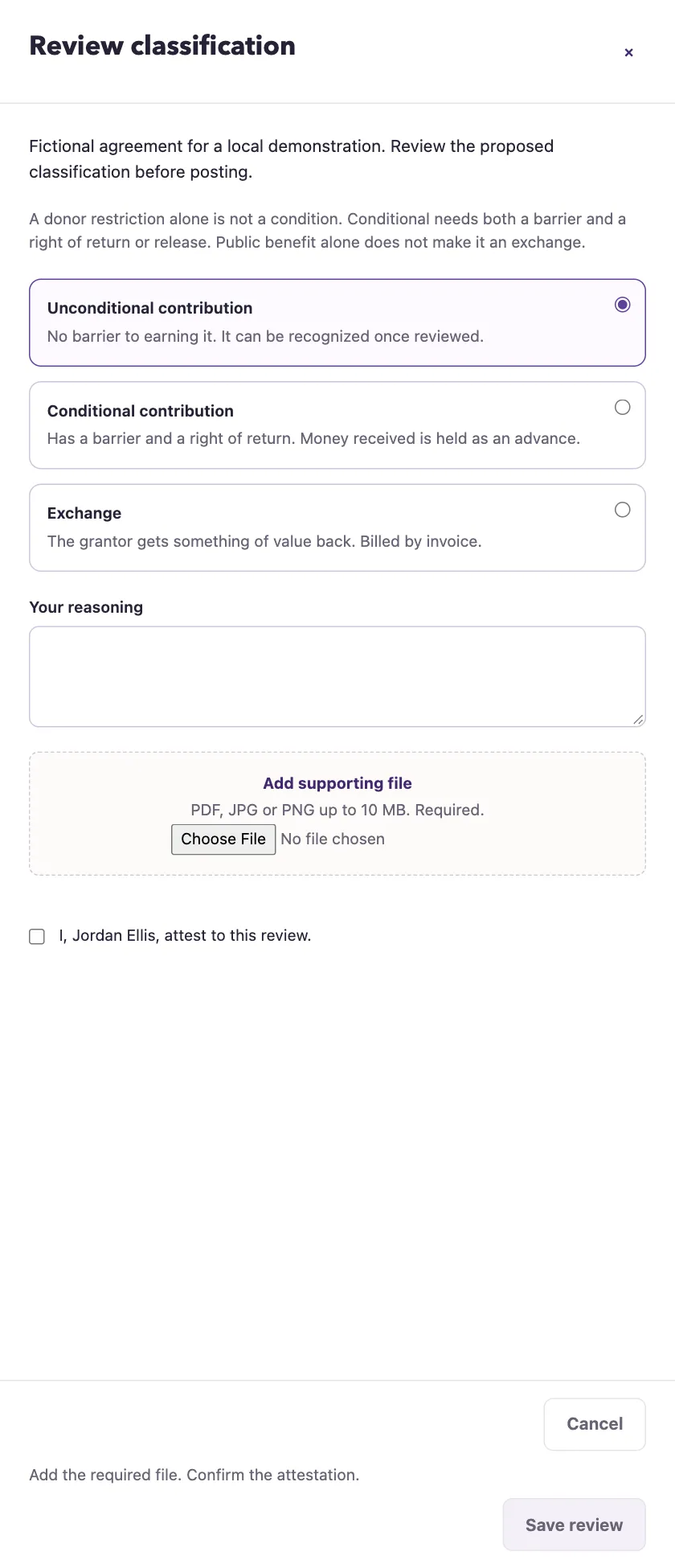
- Select Review classification to open the side panel.
- Read the agreement shown in the panel.
- Select Unconditional contribution, Conditional contribution, or Exchange.
- For a conditional contribution, enter Barrier.
- For a conditional contribution, enter Right of return or release.
- Enter Your reasoning.
- Select Add supporting file and wait for the filename to appear.
- Select the attestation beside your name.
- Select Save review.
Who can do this and what you need
Save your classification choice, reasoning, and supporting files before grant money can post. This screen records your review; it does not decide the classification for you.
You need View grants and Review grant classification and evidence, approved mappings, an active Operating fund, and an active award and grantor.
Uploads accept PDF, JPG, JPEG, or PNG up to 10 MB each. A review accepts 1–50 files. Reasoning, barrier, and return terms each accept up to 5,000 characters. The button explains any missing file or attestation. Validation errors reopen the panel with your entries.
What happens next
The award keeps the classification, your identity, review time, reasoning, and evidence. The saved classification enables the matching receipt, recognition, or exchange-invoice workflow. Budgeting can proceed without classification review and does not itself post money.
Before funding, Change review reopens the panel. Include every supporting file needed in the replacement review. Edit award changes agreement details separately. Changing the grantor or agreement clears the reviewer, review time, and reasoning. The proposed classification and supporting files stay. Save a new review before posting. Other editable fields keep the review.
Once funding posts, the entire award and its classification are locked. Name, agreement, and reporting dates cannot be edited after funding. Undoing funding does not unlock any of them.