
Correct or void a 1099 form record
Edit an unfiled form or create a separate correction or void record linked to a filed original.
- Who can do this
- Owners, or people with Export reports and 1099s and View financial reports
- Where
- Tax, then 1099 forms
- You'll need
- Tax turned on in Features; a draft or generated form to edit; a filed, uncorrected original to correct or void
On this page
Draft and Generated forms can be edited directly. For a Filed original, QixCount offers separate correction and void records.
Edit an unfiled form
- Open Tax, then 1099 forms, and select the vendor name.
- Select Edit.
- Change Box 1: Nonemployee Compensation, Box 4: Federal Income Tax Withheld or Notes.
- Select Update Form.
The vendor and form type cannot be changed here. Editing a Generated form leaves its status and original generation date unchanged. Delete is available for Draft and Generated forms after confirmation.
Create a correction
- Open Tax, then 1099 forms, and select the filed original's vendor name.
- Select Create Correction.
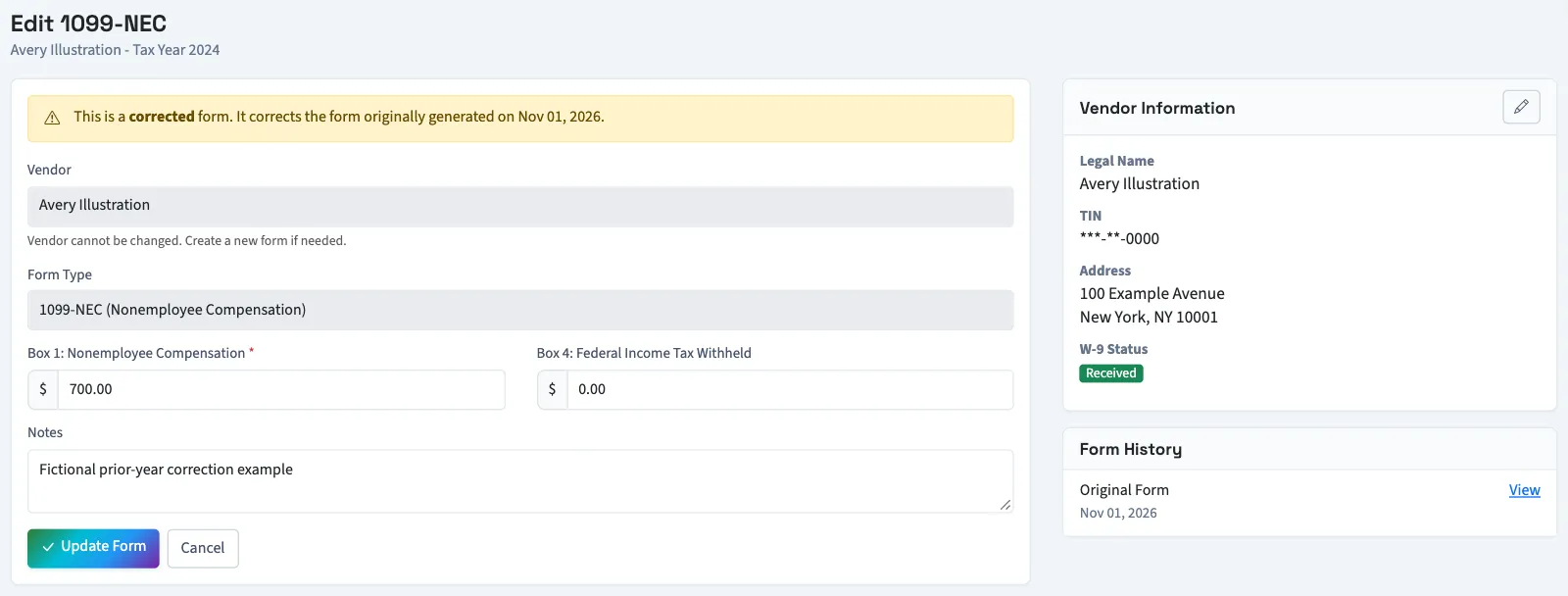
- Update the copied amounts on the new form's editing page.
- Select Update Form.
- Select Generate Form when the new draft is ready.
The correction is a separate record linked to the original. The original stays Filed. The edit page's Form History links the records. Use the review and filing steps for the new record.
Create a void record
If the original contains federal withholding, contact support before using Void Form. That action retains the withholding amount on a record you cannot edit through the form.
- Open Tax, then 1099 forms, and select the filed original's vendor name.
- Select Void Form.
- Confirm the action.
QixCount creates a linked Voided record with zero total payments and zero nonemployee compensation. You remain on the original's page, and the original stays Filed.
What happens next
Correction and void controls are available only on filed originals, not on records already marked as corrections. These actions do not change vendor payments, reverse ledger entries or submit anything outside QixCount.
Good to know
You need Export reports and 1099s for these actions and View financial reports to open forms.
If 1099 forms isn't in the sidebar, someone with settings access can turn on Tax in Features.