
Set up tax rates
Create or edit individual tax rates before adding them to a tax group.
- Who can do this
- Owners, or people with Manage business settings, roles & permissions
- Where
- Tax, then Sales tax
- You'll need
- Tax turned on in Features
On this page
A rate is one named tax component. Create rates before combining them into a group that you can select on invoice lines. You need Manage business settings, roles & permissions; owners have it.
Create a rate
- Open Tax.
- Select Sales tax.
- Select Add Tax Rate.
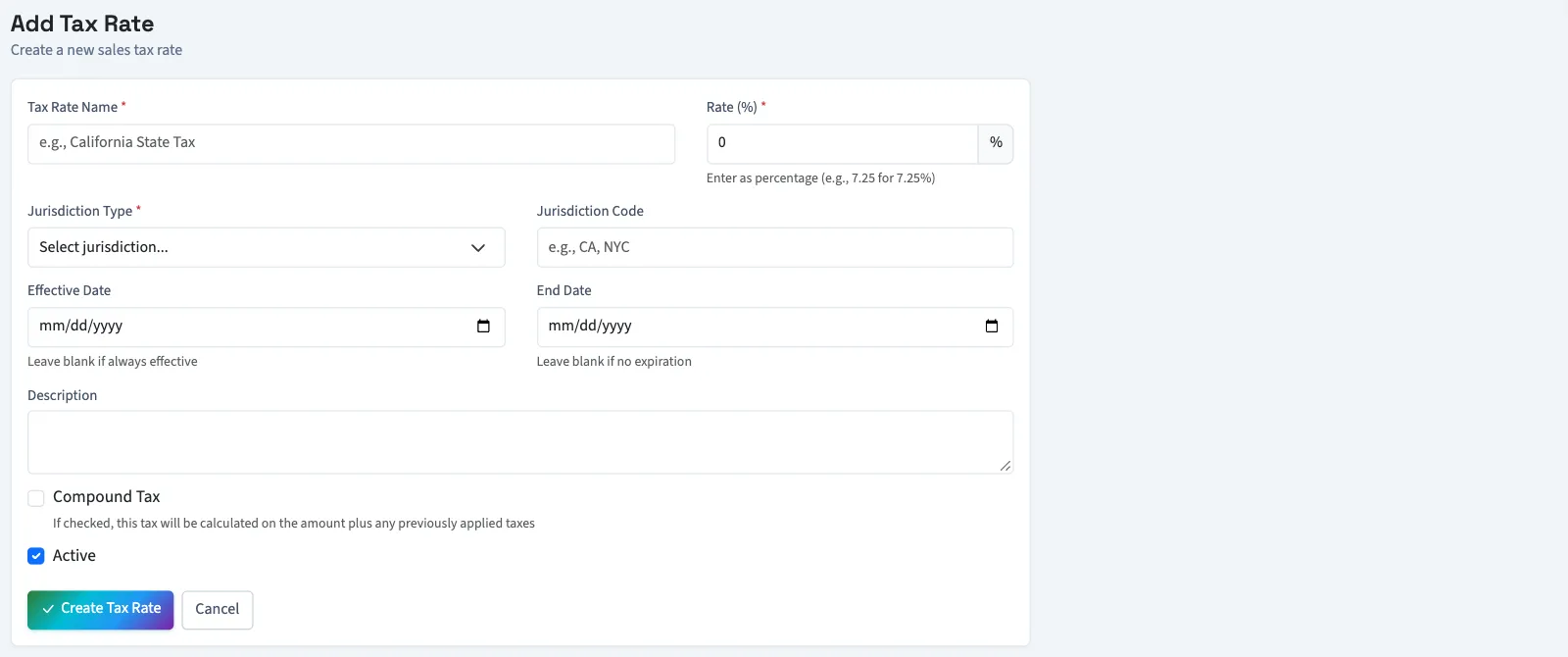
- Enter Tax Rate Name.
- Enter Rate (%), from 0 through 100, such as 7.25.
- Select Jurisdiction Type. The choices are Federal, State, County, City and Special District.
- Enter Jurisdiction Code if needed. It accepts up to 10 characters.
- Enter Effective Date if needed.
- Enter End Date if needed. When both dates are supplied, the end date must be later.
- Review Compound Tax.
- Leave Active selected.
- Select Create Tax Rate. You return to the Sales Tax page.
Change a rate
On the Sales Tax page, select the rate's pencil icon. Change the fields and select Update Tax Rate. On this edit form, clearing Active makes the rate inactive.
To save an inactive rate, create it first, then clear Active on its edit form and select Update Tax Rate.
What happens next
Only active rates whose effective dates have started and end dates have not passed are offered when you create or edit a group. A rate with no dates has no date restriction.
Next, create a tax group. Creating a rate alone does not add tax to an invoice.
Good to know
If Sales tax isn't in the sidebar, someone with settings access can turn on Tax in Features.