
Record a tax return and its payment
Mark a filing period as filed and record payments against its saved amount owed.
- Who can do this
- Owners, or people with View financial reports
- Where
- Tax, then Filing periods
- You'll need
- Tax turned on in Features; a filing period with its amounts entered
On this page
Use the filing record to track a return you filed and a payment you made outside this screen. These actions update the filing record.
Record the filing
- Open Tax.
- Select Filing periods.
- Select the period's View Details icon.
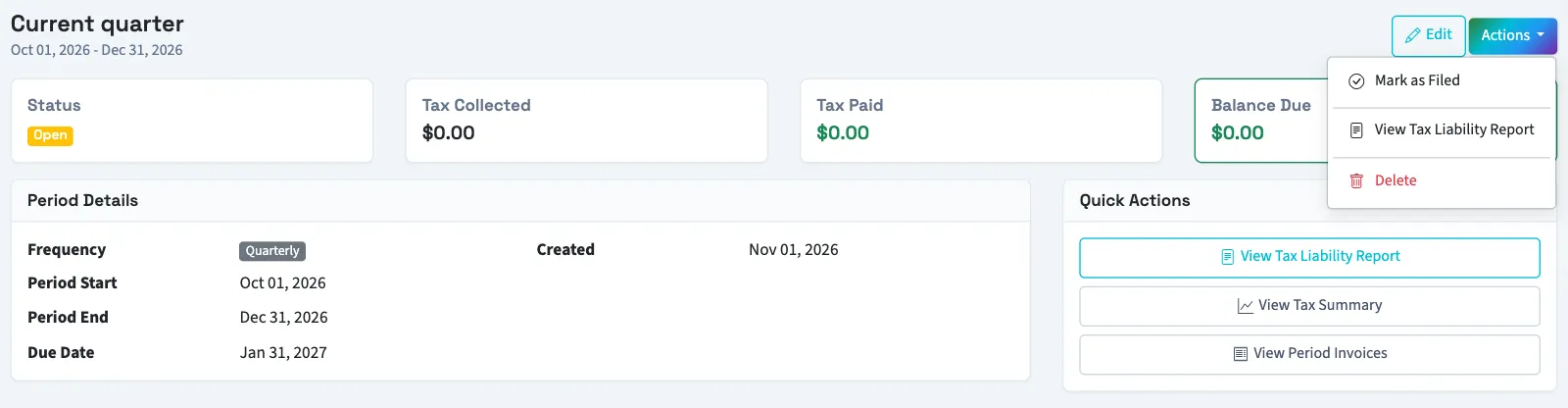
- Open Actions.
- Select Mark as Filed. This choice appears for open periods.
- Enter Filing Reference Number if needed, up to 255 characters.
- Select Mark as Filed in the dialog.
QixCount records today's date and changes the status to Filed. The normal Edit and Delete controls are no longer shown.
Record a payment
- On the period's details page, open Actions.
- Select Record Payment. It appears when the saved balance is greater than zero.
- Enter Payment Amount. The dialog initially shows the remaining balance.
- Select Record Payment.
What happens next
The amount is added to tax paid. When total payments reach or exceed tax owed, status becomes Paid. Otherwise, the existing status remains. The balance never displays below zero.
The alternate details page reached from Sales tax requires Manage business settings, roles & permissions. Its Mark as Filed and Record Payment forms are directly on the page. Payment there must be at least $0.01. Review the saved tax-paid amount on the Filing periods sidebar page before recording another payment.
Next, review the tax liability report.
Good to know
They do not submit a return, send money or create a ledger payment.
Who can do this and what you need
Create the filing period and enter its amounts. You need View financial reports for the Filing periods sidebar pages.
If Filing periods isn't in the sidebar, someone with settings access can turn on Tax in Features.