
Create and manage tax filing periods
Create dated filing records and enter the amounts used to track filing and payment status.
- Who can do this
- Owners, or people with View financial reports for the Filing periods sidebar pages
- Where
- Tax, then Filing periods
- You'll need
- Tax turned on in Features
A filing period is a tracking record with a date range, due date and amounts. Creating one starts its amounts at zero; QixCount does not calculate them from invoices.
Create a filing record
- Open Tax.
- Select Filing periods.
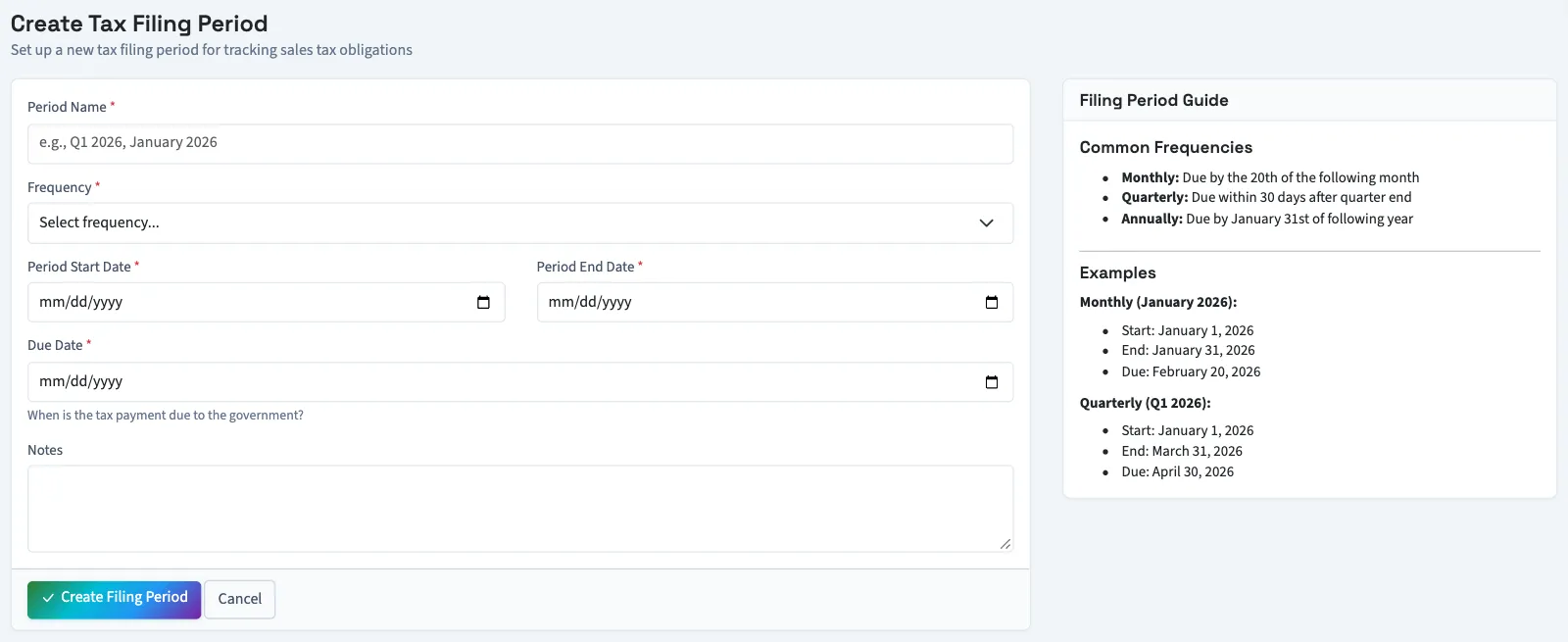
- Select New Filing Period.
- Enter Period Name.
- Select Frequency: Monthly, Quarterly or Annually.
- Enter Period Start Date.
- Enter Period End Date. It cannot precede the start.
- Enter Due Date. It cannot precede the period end.
- Enter Notes if needed.
- Select Create Filing Period. You return to the list.
Enter the amounts
- Select the open period's Edit icon from the list.
- Enter Tax Collected under Tax Amounts, using zero or a positive amount.
- Enter Tax Owed, using zero or a positive amount.
- Enter Tax Paid, using zero or a positive amount.
- Select Update Filing Period.
The balance shown is tax owed minus tax paid, with a minimum of zero. Changing amounts through Edit does not automatically change the status. You can delete an open period from its details page's Actions menu after confirming the deletion.
Use the Sales Tax entry point
On Sales tax, select View All under Recent Filing Periods, then Add Filing Period. This opens the same records through a different form. Its date rules are stricter: period end must follow start, and due date must follow end. It does not provide the amount-editing form described above.
Next, record a filing and payment.
Good to know
If Filing periods isn't in the sidebar, someone with settings access can turn on Tax in Features.
The Filing periods sidebar page requires View financial reports, including its create and edit actions. The separate filing-period pages reached through Sales tax require Manage business settings, roles & permissions.