
Compare a budget with actuals
Read monthly budget variances, open charts and request Qix analysis of the comparison.
- Who can do this
- Owners, or people with View budgets
- Where
- Books, then Budgets
- You'll need
- Budgets turned on in Features
On this page
The budget report compares monthly plans with posted activity for the same fiscal period dates.
Read the monthly comparison
- Open Books, then Budgets.
- Select the budget you want to review.
- Review each account's monthly figures on Report.

Each cell shows the budget amount, an Act: amount for actual activity, and a Var: amount for variance. Variance is actual minus budget. Revenue at or above budget is green; expenses at or above budget are red. The rightmost column totals each account across the fiscal periods.
Actuals use posted transactions. Draft transactions and closing entries are excluded. A void affects the figures through its reversal. Revenue actuals use credits minus debits; expense actuals use debits minus credits.
Open the charts
- Select Insights.
- Review Budget vs Actual and Monthly Variance.
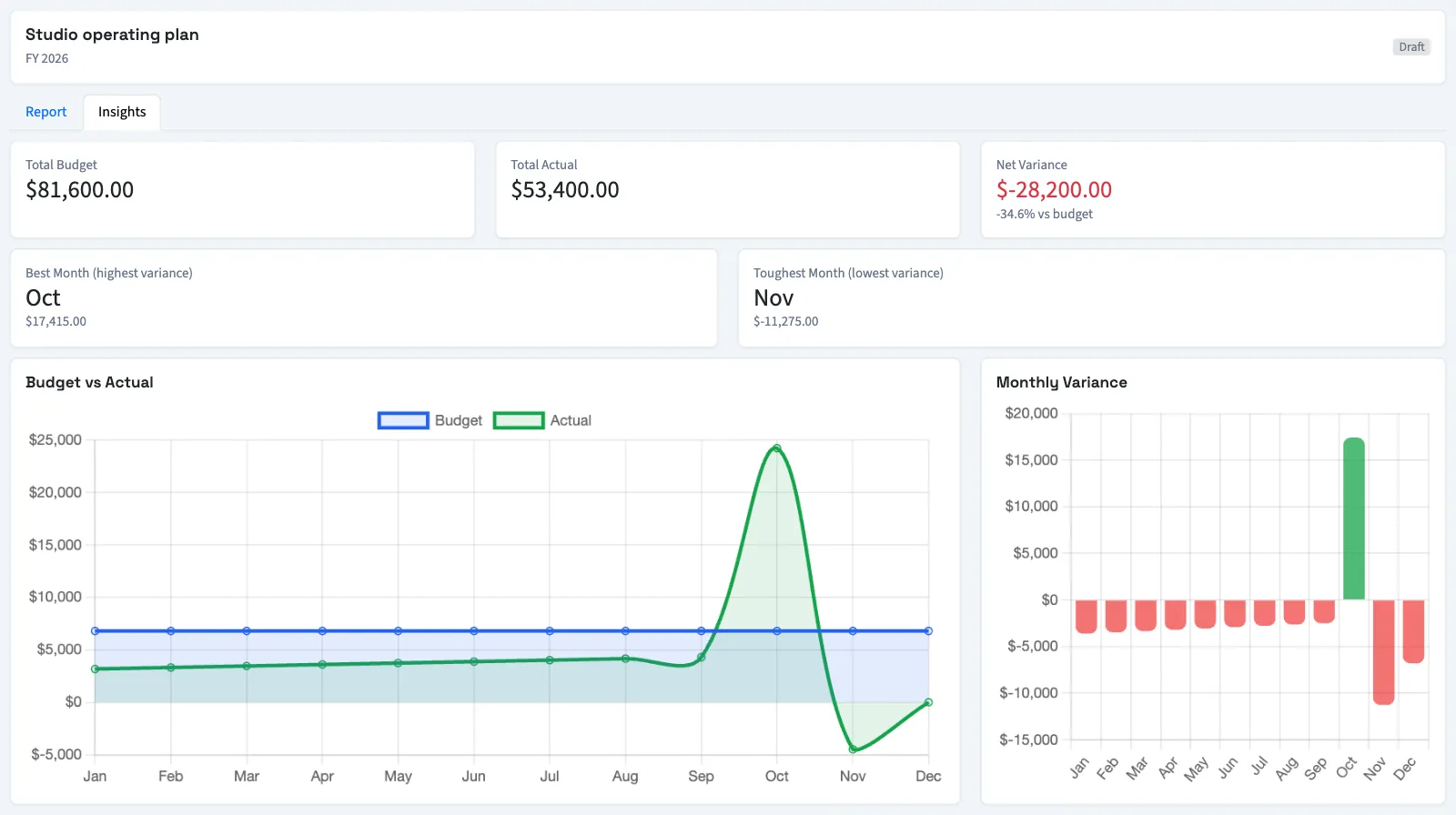
The page also shows total budget, actual and variance amounts. A percentage is unavailable when the total budget is zero. Best Month (highest variance) and Toughest Month (lowest variance) rank the combined monthly difference.
NoteThe totals and insights add revenue and expense amounts together. They do not calculate net profit. A higher combined variance can include higher spending, so check the individual account rows before interpreting the result.
Ask Qix about the comparison
On Report, select AI Insight to request analysis of the budget totals and largest account variances. QixCount cannot analyze the budget when both combined budget and actual totals are zero. If analysis fails, the page displays an error; the report remains available.
What happens next
Reading charts or requesting analysis does not change budget amounts. To share the figures, Export a budget.
Good to know
You can read any budget status, including a draft, with View budgets permission.
If Budgets isn't in the sidebar, someone with settings access can turn on Budgets in Features.