
Review a project's details
Find a project's invoices, bills, budget progress, financial summaries and recent activity.
- Who can do this
- Owners, or people with View projects
- Where
- Projects, then All projects
- You'll need
- Project tracking turned on in Features
On this page
Open a project's details to review the documents linked to it. You need View projects permission, and project tracking must be enabled.
Find the project
- Open Projects.
- Select All projects.
- Select the project name.
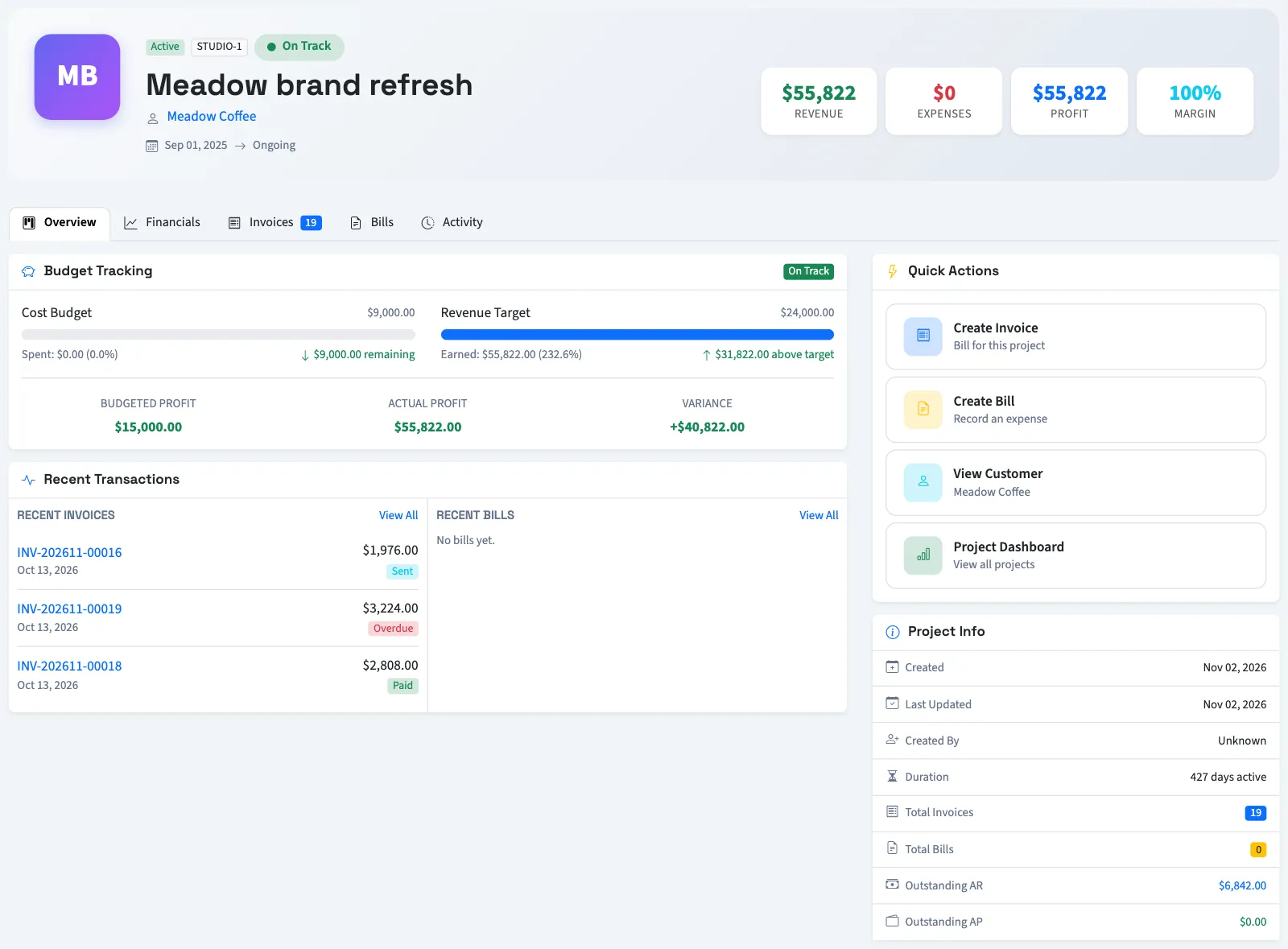
The header shows its status, optional code, customer and dates. With report permission, it also shows invoice revenue, bill expenses, profit and margin.
Choose a tab
| Tab | What you can review |
|---|---|
| Overview | Description, recent invoices and bills, project information, and budget progress when targets and report permission are present. |
| Financials | Profit margin, budget use, outstanding customer and vendor balances, charts and a financial summary. Requires report permission. |
| Invoices | Linked non-void invoices with dates, statuses, totals and balances. |
| Bills | Linked non-void bills with dates, statuses, totals and balances. |
| Activity | A timeline assembled from project creation, recent linked documents, paid-document events and the current non-active status. |
Select a document number to open it with permission to view that document type. Each document list has its own pagination, with 15 documents per page. The activity timeline is a recent summary, not a complete history of every project change.
Read the figures
Revenue is the total of linked non-void invoices, including drafts. Expenses use linked non-void bills, also including drafts. Profit subtracts expenses from revenue. Paid and outstanding amounts are shown separately. Outstanding customer balances exclude Draft, Paid, and Void invoices; these totals are not cash-only or posted-ledger reports.
Use Financial Summary on Financials to review total paid and outstanding balances. Check the Invoices and Bills tabs for the individual documents behind those amounts.
Budget use compares bill totals with the project's cost budget. The project shows an approaching-limit indicator from 80% and an over-budget indicator from 100%. A zero or missing cost budget has no utilization percentage.
The monthly financial chart starts from the project's start date, or creation date if absent, and shows at most 12 months. It can cover fewer months than the document totals.
What happens next
Reviewing this page changes no documents. To add work, see Assign invoices and bills to a project. To compare projects, open the Project overview dashboard.
Good to know
View project profitability permission adds financial summaries and the financials tab.
If All projects isn't in the sidebar, someone with settings access can turn on Project tracking in Features.