
Edit or archive a project
Change project details or remove a project from normal use while keeping its existing documents.
- Who can do this
- Owners, or people with View projects; changes need Edit projects; the Archive action needs Delete projects
- Where
- Projects, then All projects
- You'll need
- Project tracking turned on in Features
Update a project's schedule, customer, status or targets as the job changes. You need View projects to open the project and Edit projects to change it. The separate archive action requires Delete projects permission.
Change the details
- Open Projects, then All projects, and select the project.
- Select Edit.
- Change the fields you need.
- Select Save Changes.
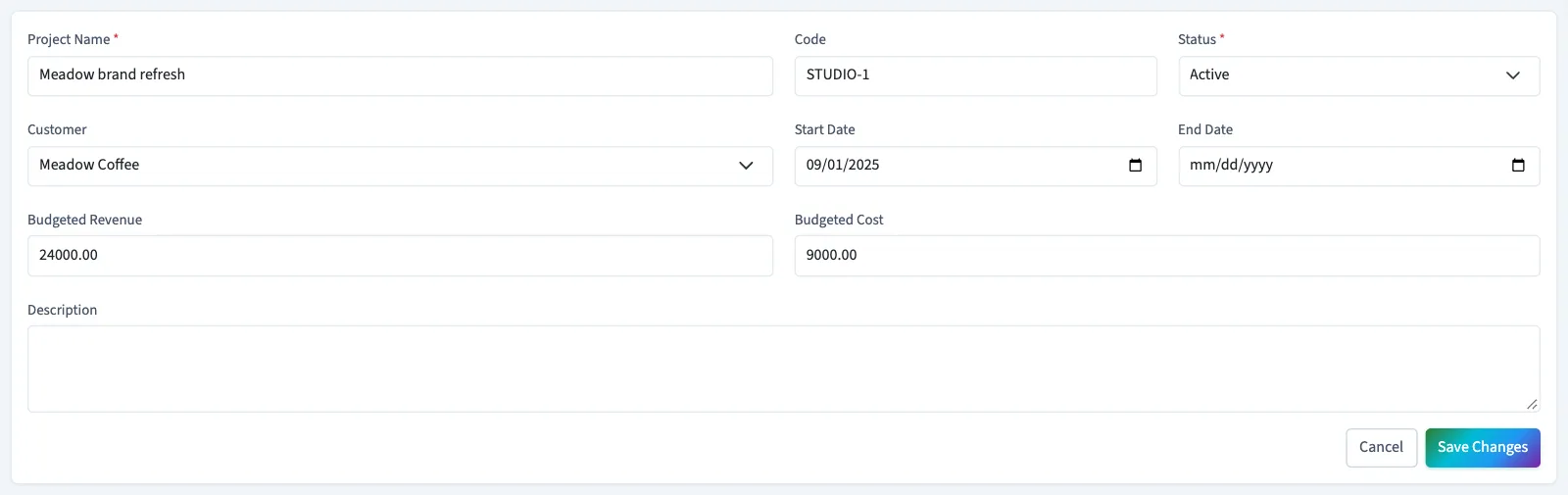
The same limits apply as when creating a project: the name allows 255 characters, the unique code allows 50, and the description allows 2,000. Budget amounts must be zero or greater. An end date must not be before the entered start date.
Changing a project's customer does not rewrite the customer on its existing invoices. Changing its targets updates the project's comparisons without changing invoice or bill amounts.
Choose how to archive
There are two different results:
| Choice | Result |
|---|---|
| Set Status to Archived on the edit form | Keeps the record in the project list. You can find it with the archived status filter and edit its status again. |
| Open the dropdown next to Edit on the details page, then select Archive Project | Marks the project archived and removes it from the list after you confirm. The project screens do not offer a restore action. |
Both choices stop the project appearing as a new invoice or bill choice. Existing linked documents remain. When editing a draft document, QixCount can retain its existing archived project assignment, but you cannot newly assign another document to that archived project.
What happens next
Archiving a project does not void its invoices or bills. Review any balances before using the archive action, because the project will disappear from the normal project screens.
To review its documents first, see Review a project's details.
Good to know
If All projects isn't in the sidebar, someone with settings access can turn on Project tracking in Features.