
Use the project overview dashboard
Compare project revenue, costs, profit and budget use, then download a project CSV.
- Who can do this
- Owners, or people with View project profitability
- Where
- Projects, then Project overview
- You'll need
- Project tracking turned on in Features
On this page
The project overview compares jobs using linked invoice and bill totals.
Compare your projects
- Open Projects.
- Select Project overview.
- Choose Status if you want to narrow the results.
- Choose Customer if needed.
- Enter a name or code in Search if needed.
- Select a Sort By option.
- Select Over budget if you want only projects whose bills exceed their cost budget.
- Select Filter.
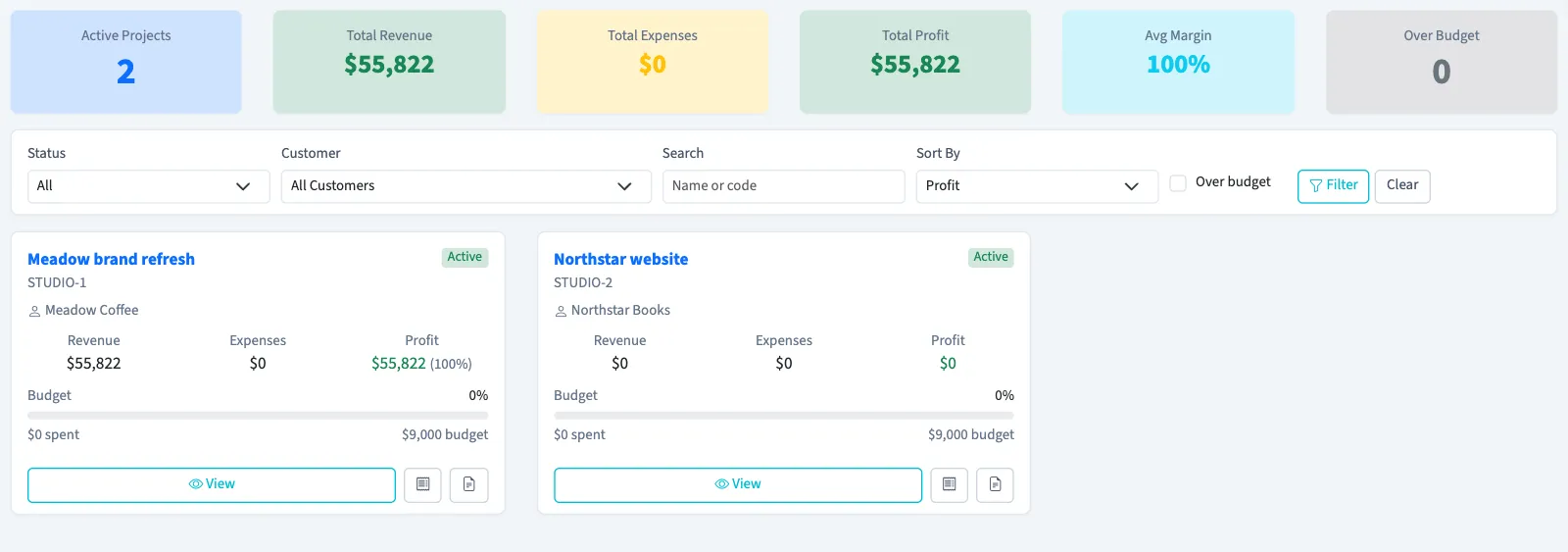
You can sort by profit, revenue, expenses, margin, budget used or name. Results use descending order by default. With View projects permission, select a project name or View to open its details. List View returns to the project list and also requires View projects permission.
Understand the comparisons
Revenue includes non-void invoice totals; expenses include non-void bill totals. Both include drafts. Profit is revenue minus expenses. Margin divides that profit by revenue when revenue is positive.
The Avg Margin card divides combined profit by combined revenue. It does not average the percentages on individual cards.
Cost budget indicators change color at 80% and 100% use. The Over budget filter and summary count require expenses to be strictly greater than budget. A project exactly at 100% can show a red indicator without appearing in that filter.
NoteThe summary cards follow status, customer and search filters. Selecting Over budget narrows the project cards but does not narrow the summary totals.
Export the overview
For a CSV of a status and customer selection, clear Search, clear Over budget, then select Filter and Export CSV. The file includes project identity, customer, status, revenue, expenses, profit, margin, cost budget, budget use, budget status and dates.
Use the on-screen cards for searches or an over-budget selection. The CSV lists projects by name. Check that the downloaded file contains the projects you intend to share.
What happens next
Filtering and exporting change no project data. For grouped results and project-date filters, see Read project profitability reports.
Good to know
You need View project profitability permission, and project tracking must be enabled. Archived projects are excluded.
If Project overview isn't in the sidebar, someone with settings access can turn on Project tracking in Features.