
Review and download the General year-end package
Open the financial summary and download a PDF of year-end figures, 1099 records and tax filing records.
- Who can do this
- Owners, or people with Manage business settings, roles & permissions
- Where
- Books, then Year-end close
- You'll need
- Period close turned on in Features; an existing General year-end closing record
On this page
Review the financial summary
- Open Books, then Year-end close, and select a year.
- Select Financial Summary.
- Check the year and dates below the heading.
- Review the figures and account rows.
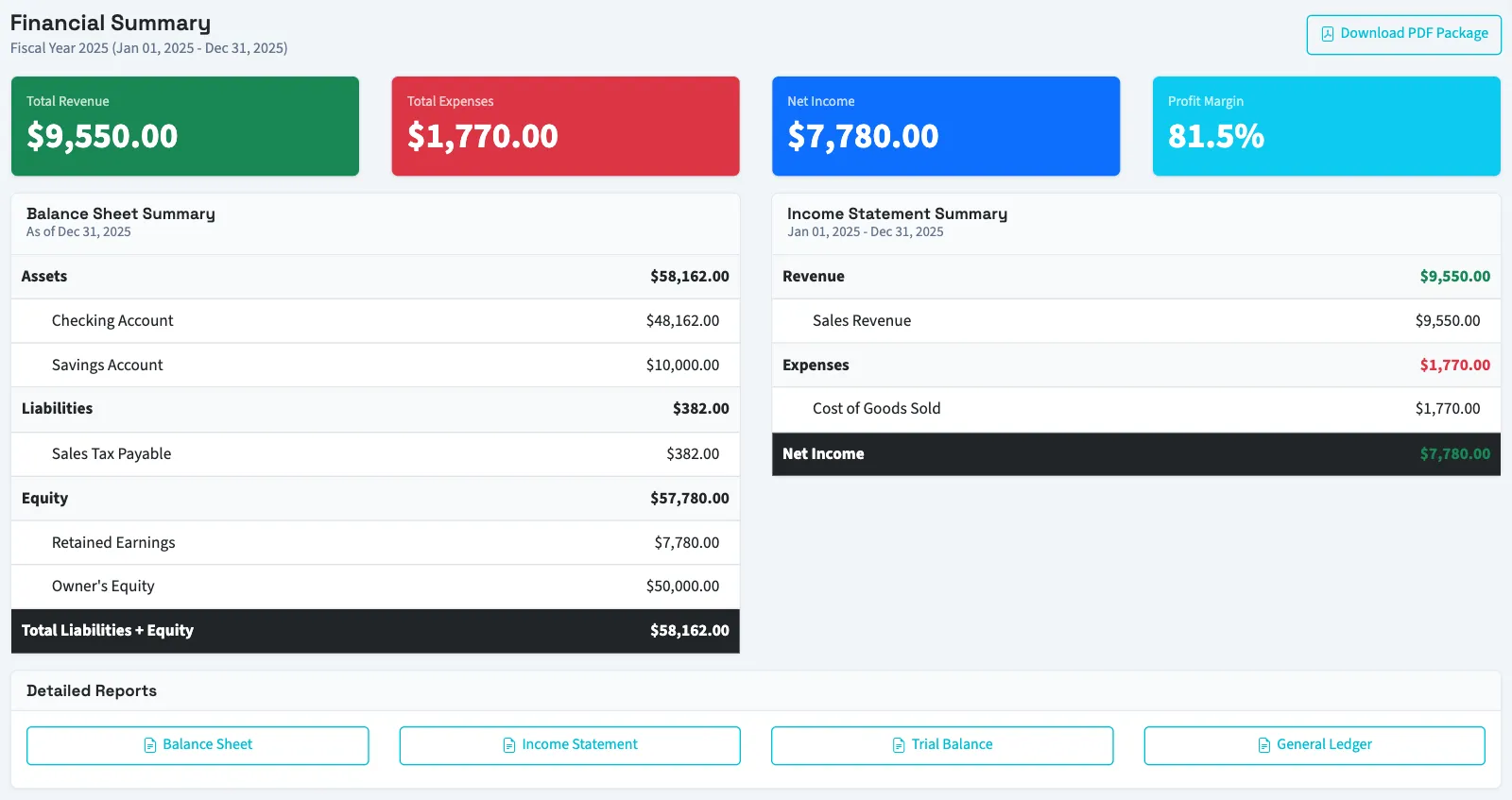
| Figure | What it contains |
|---|---|
| Total Revenue | Posted revenue credits less debits within the year, excluding closing entries. |
| Total Expenses | Posted expense debits less credits within the year, excluding closing entries. |
| Net Income | Revenue less expenses. |
| Profit Margin | Net income divided by positive revenue, expressed as a percentage; zero when revenue is not positive. |
| Balance Sheet Summary | Asset, liability and equity account balances, including inactive accounts, through year-end, plus earnings not yet moved out of income accounts. |
| Income Statement Summary | Revenue and expense account activity, including inactive accounts, within the year, excluding closing entries. |
The headline totals and account summaries both include posted activity on inactive accounts. The detailed report links open separate report pages for further review.
Download the package
- Select Download PDF Package on the summary page, or Download Package on the closed year's page.
- Save the PDF.
The package contains an executive summary, balance sheet, income statement, 1099 summary and tax filing summary. The 1099 records are selected by tax year. Tax filing records must fit entirely within the saved fiscal-year dates.
The PDF is calculated when downloaded. It is not a frozen copy captured at closing, and recorded tax statuses do not confirm submission to an outside agency.
Next, review the balance sheet or reopen and re-close a General year.
Good to know
The year-end package gathers the selected year's financial figures and recorded tax activity into a PDF. Downloading it does not post entries, file forms or send payments.
Who can do this and what you need
You need Manage business settings, roles & permissions permission. This article covers General businesses. The closing page offers Download Package after the year is closed. The Financial Summary page also offers Download PDF Package while a closing is still open; a download alone is not evidence that the year has been closed.
If Year-end close isn't in the sidebar, someone with settings access can turn on Period close in Features.