
Read the audit readiness score
Understand the score deductions, labels, and checklist shown on the Audit Readiness page.
- Who can do this
- Owners, or people with View audit trail
- Where
- Books, then Compliance
- You'll need
- Audit & compliance turned on in Features
On this page
The Audit Readiness Score is QixCount's calculation from four checks. It is not an external assessment or a prediction of an audit result.
Open the score details
- Open Books, then Compliance.
- Select Audit Readiness or View Full Checklist.
- Read Score Breakdown to see the counts and deductions.
- Select Review beside a checklist item to open its detailed page when available.
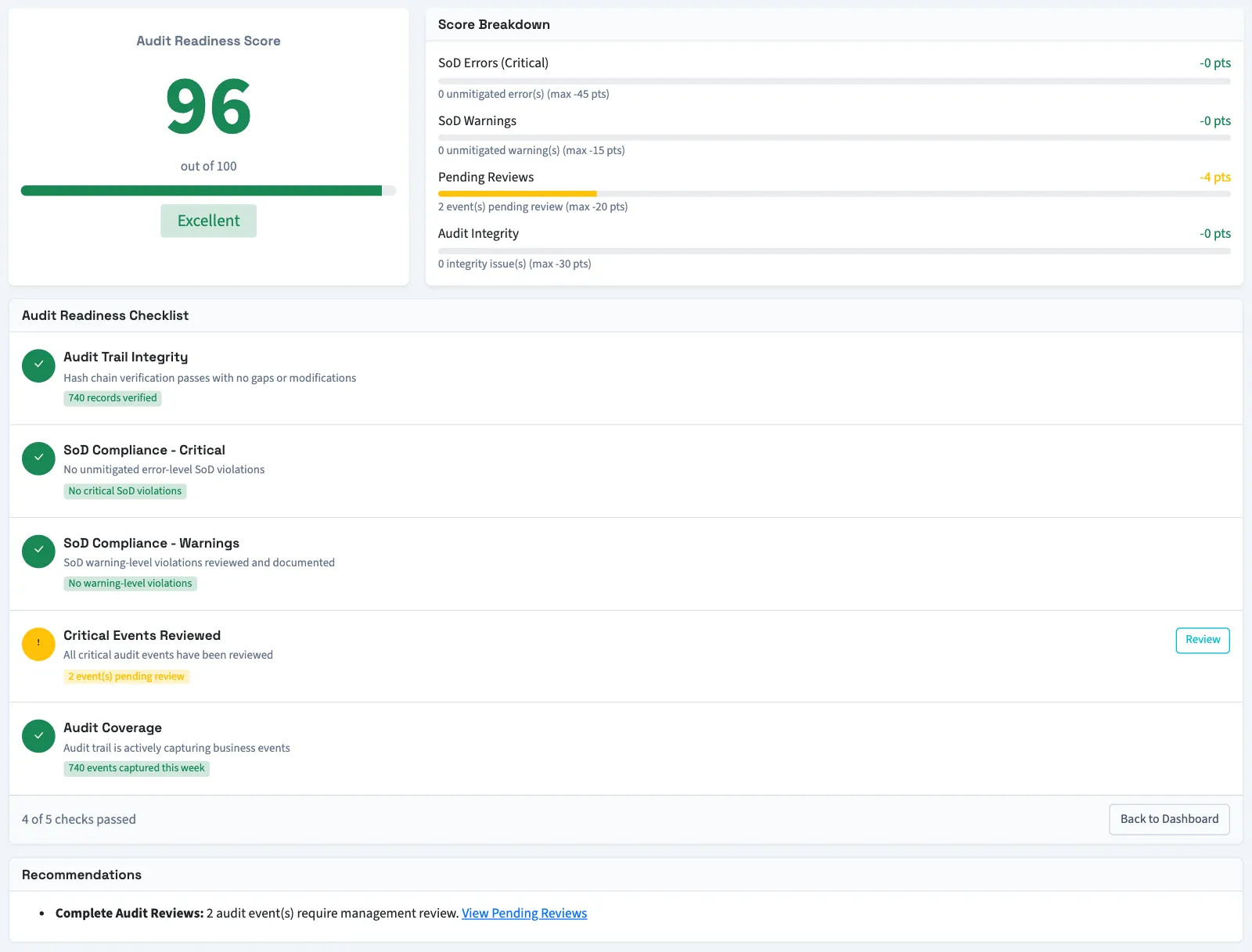
Understand the deductions
The score starts at 100 and cannot fall below zero. Segregation of duties (SoD) means the permission-pair checks configured in QixCount. These checks exclude owners.
| Score component | Deduction |
|---|---|
| SoD Errors (Critical) | 15 points per error without a currently valid override, up to 45 points. |
| SoD Warnings | 5 points per warning without a currently valid override, up to 15 points. |
| Pending Reviews | 2 points per flagged audit entry without a review time, up to 20 points. |
| Audit Integrity | 30 points if the most recent 100 hash entries contain any detected problem. |
The labels are Excellent for 90–100, Good for 75–89, Fair for 60–74, Needs Improvement for 40–59, and Critical below 40.
Read the checklist separately
Audit Readiness Checklist is calculated automatically. It checks the recent hash chain, error-level permission matches without overrides, warning-level permission matches, pending audit reviews, and whether any audit events were captured in the past week. You do not tick these items yourself.
The checklist and score are not identical. A warning with an active override causes no score deduction, but still appears as a warning in the checklist. A business with no events in the past week can receive a checklist warning without losing score points.
Missing hashes do not by themselves reduce the score. The integrity check also covers only recent entries, even when a checklist message refers to the total record count. See Check audit integrity for the scope and limitations.
Use the separation of duties report or the audit trail to read the individual records behind the counts.
Good to know
If Compliance isn't in the sidebar, someone with settings access can turn on Audit & compliance in Features.
You need View audit trail permission. Owners have this permission.