
Close a General fiscal year
Start a year-end closing, complete its checklist and understand the entries QixCount posts for General businesses.
- Who can do this
- Owners, or people with Manage business settings, roles & permissions
- Where
- Books, then Year-end close
- You'll need
- Period close turned on in Features; an open General closing with every checklist item complete and no locked posting date
On this page
Start and complete the closing
- Select Year-end close in Books.
- Select Start Year-End Closing.
- Choose Fiscal Year.
- Review Fiscal Year Start and Fiscal Year End.
- Enter Notes if needed.
- Select Start Year-End Closing to create the closing record.
- Check the saved dates on the closing page.
- Select Complete beside each item in Closing Checklist after completing the named work.
- Select Close Fiscal Year when the checklist reaches 100%.
- Confirm the close.
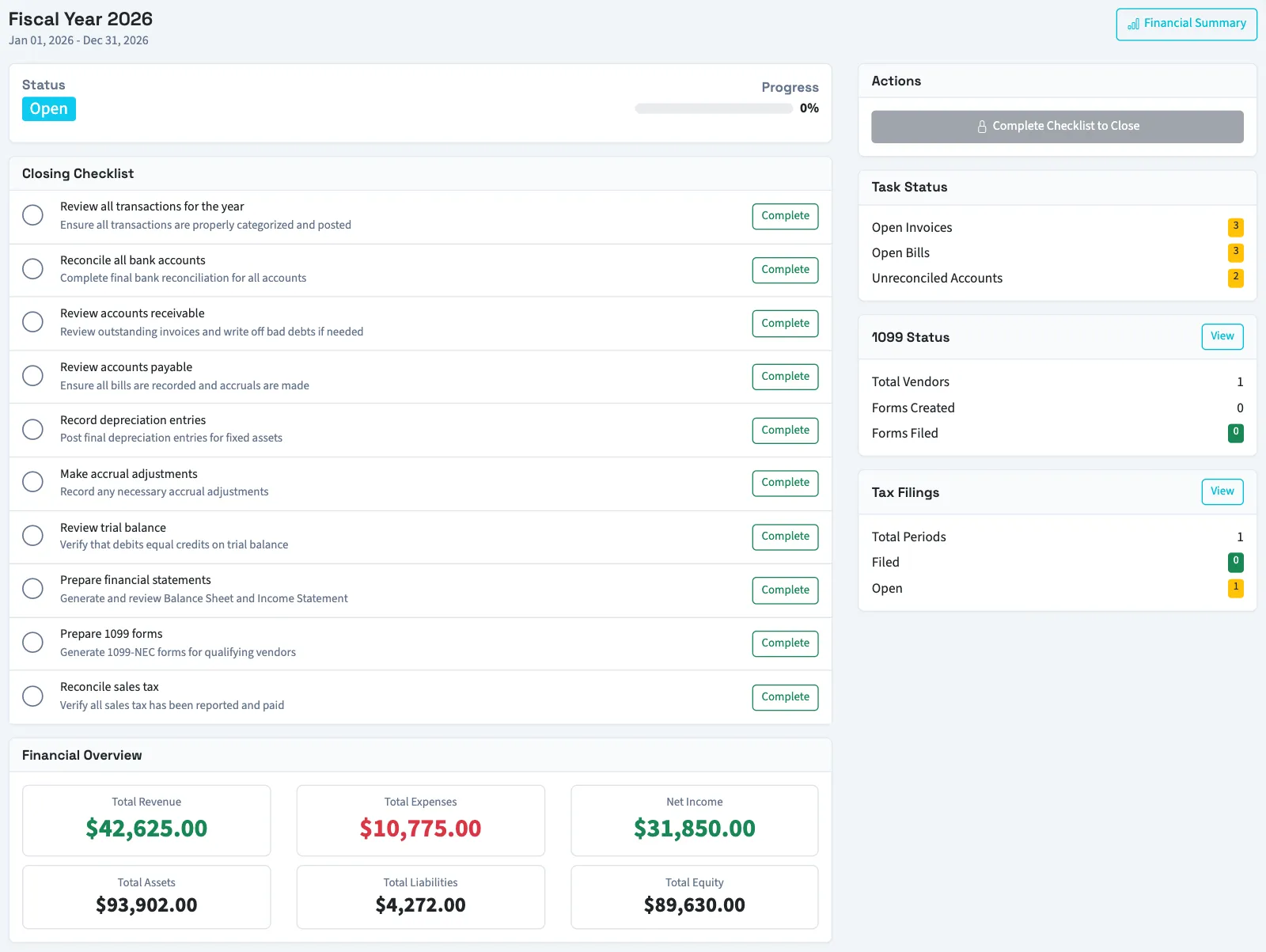
The year list offers the current fiscal year and five earlier years, excluding years with an existing closing. The saved start can move forward if an earlier closed year overlaps it. Use Undo to clear a checklist mark before closing.
What happens next
| Status | Meaning |
|---|---|
| Open | The closing record exists and no item has started the workflow. |
| In Progress | An item has been completed, or a closed year has been reopened. |
| Closed | The close finished; checklist changes are blocked. |
Checklist marks are manual confirmations. The Task Status counts do not block closing and include open invoices, bills and in-progress reconciliations across the business, not only this year.
Closing posts dated year-end entries for remaining revenue and expense accounts, including inactive accounts with balances, transfers the result to retained earnings, and closes qualifying open fiscal periods for that fiscal year. It also closes remaining positive draws or dividends through the configured closing process. The closing time and person are saved. Ordinary journals dated in the closed year are blocked even if no monthly periods were created; reopen the year before posting a correction.
Next, download the year-end package. For later corrections, read reopen and re-close a year.
Troubleshooting
If Start Year-End Closing is missing, the current fiscal year already has a closing record. Open that year from the list. Contact support if you need to start an older year and cannot reach the create screen.
Good to know
Year-end close in General creates closing entries that move revenue and expense balances through an income summary account into retained earnings. Retained earnings holds accumulated results moved out of income accounts. This article describes the General workflow.
Who can do this and what you need
You need Manage business settings, roles & permissions permission. Period close under Features controls whether the menu row appears. Year-end accounts can be selected under Accounting setup, in Year-end close, using Retained earnings and Income summary. If neither is set, QixCount looks for or creates its default accounts.
Year-end entries can post into closed periods, but locked periods can block them.