
Review several bank transactions at once
Use the bank feed selection bar for categories, posting, exclusion, and restoration.
- Who can do this
- Owners, or people with View reconciliations and Edit bank transactions
- Where
- Banking, then Bank feed
Use the bank feed's selection bar to apply one action to several records. You need View reconciliations and Edit bank transactions. Owners have both.
Select the records
- Open Banking, then Bank feed.
- Select the account and review tab.
- Select each record's checkbox, or the table-header checkbox.
- Check the selected count in the bar at the bottom.
The header checkbox selects records on the current page. On Excluded, select skipped rows individually so retained correction history is left out. Use Clear to clear the selection. Review the selection again after changing the page or filters.
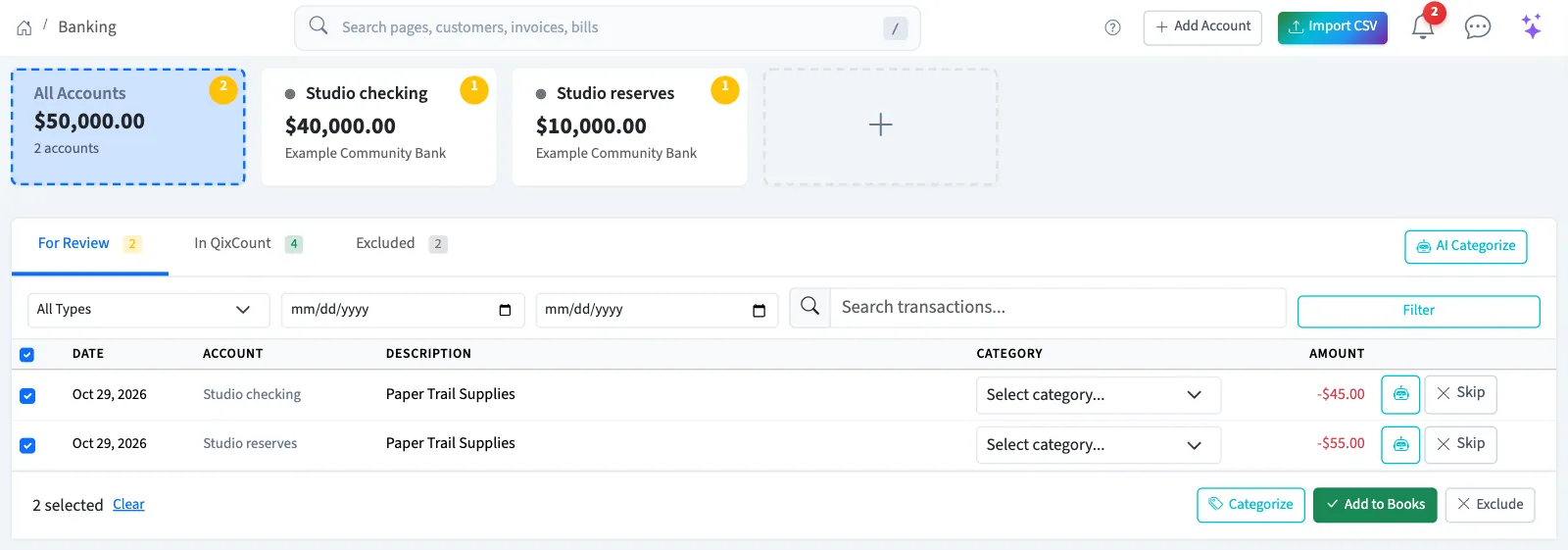
Choose a bulk action
| Tab | Action | Result |
|---|---|---|
| For Review | Add to Books | Posts eligible records that already have a category. Already imported records and retained reversals are not added. |
| For Review | Exclude | Marks selected records skipped after confirmation. |
| In QixCount | Undo | Runs the individual undo action for each selected record, with confirmation prompts. |
| Excluded | Restore | Returns skipped records to For Review. Retained reversal history is not restored. |
For records that need a category and a new ledger posting, use the single-record workflow and select Add before leaving the page. Bulk Categorize reloads the page and moves the records out of For Review before you can post them. If this has already happened, check for a linked journal and contact support; do not enter duplicate bank records.
WarningAdd to Books posts journals and Undo changes accounting records. Review categories, existing matches, and undo consequences before proceeding. A bulk action is not a promise that every selected record was changed.
What happens next
Review the resulting records and any message, then reconcile the account. For a record that needs editing or deletion, follow the individual transaction task.