
Review the bank feed
Understand review tabs, transaction statuses, account filters, and the transaction list.
- Who can do this
- Owners, or people with View reconciliations; actions need Edit bank transactions
- Where
- Banking, then Bank feed
On this page
Open Banking, then Bank feed to review bank records. You need View reconciliations. Actions that categorize, add, exclude, restore, or undo need Edit bank transactions. Owners have both.
Find records
- Select an account tile.
- Select All Types or a transaction type.
- Enter a date range or Search transactions....
- Select Filter.
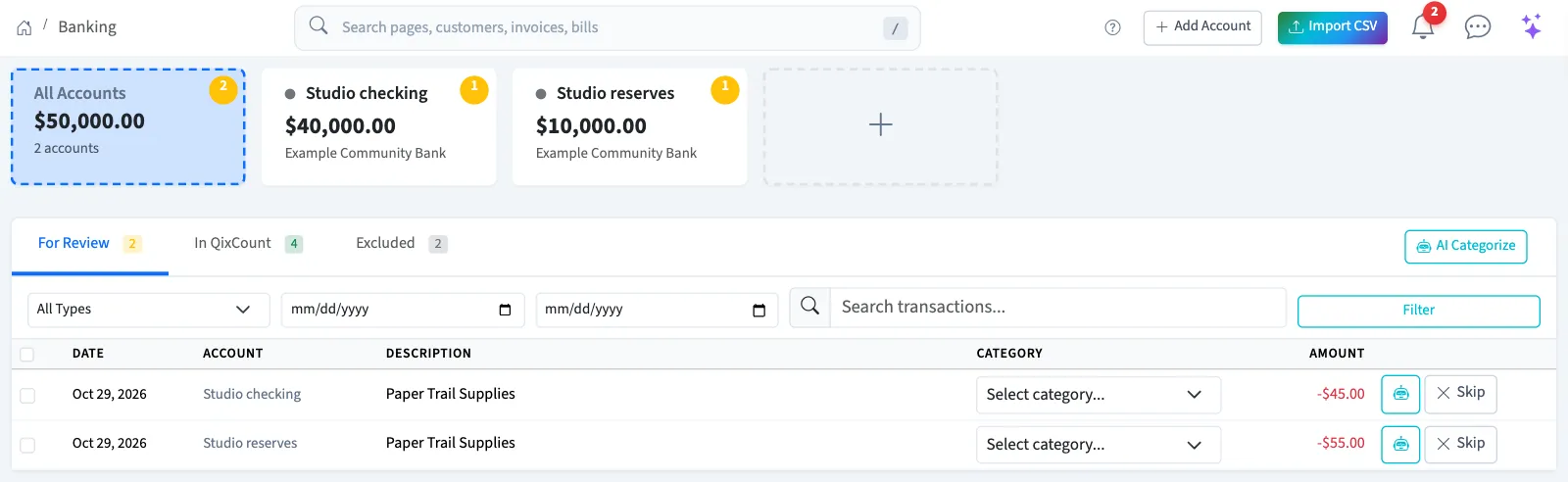
The feed shows 50 records per page. Account tiles list active accounts. An empty result can mean the selected account, tab, or filters have no matching records.
Open transaction details
From an account's detail page, select View All under Recent Transactions. This opens the separate Bank Transactions list. Select a transaction's description to open its details.
That list uses a different status:
| Status | Meaning |
|---|---|
| Pending | The record has not been marked cleared or reconciled. |
| Cleared | The record has been marked cleared. |
| Reconciled | The record was marked reconciled. |
| Void | The record carries the void status. |
These statuses are separate from the feed's review tabs. Next, review suggestions, match a transaction, or reconcile an account.
Good to know
Understand the tabs
Select an account tile or All Accounts, then select a review tab.
| Tab | Records included |
|---|---|
| For Review | Records still pending review. |
| In QixCount | Records marked reviewed or imported. This includes categorized records without a ledger posting. |
| Excluded | Skipped records and retained reversal history. |
The count badges describe these review groups. A category or an In QixCount location alone does not prove that a journal exists. Categorize and add a transaction explains the posting step.