
Use bank matching and learned patterns
Set automatic matching criteria and inspect the patterns and statistics from previous matches.
- Who can do this
- Owners, or people with Perform reconciliation
- Where
- Settings, then Bank matching
Bank matching can link newly imported Plaid records to existing invoices, bills, and payments. It marks accepted automatic matches cleared and reviewed. It does not complete a statement reconciliation or record a new payment.
Review matching settings
- Open Settings, then Bank matching.
- Review Match transactions automatically.
- Set How sure must a match be? between 50% and 100%.
- Set an optional Largest amount to match, zero or greater; blank means no limit.
- Choose at least one record type under Match against.
- Review Require the exact amount.
- Select Save changes.
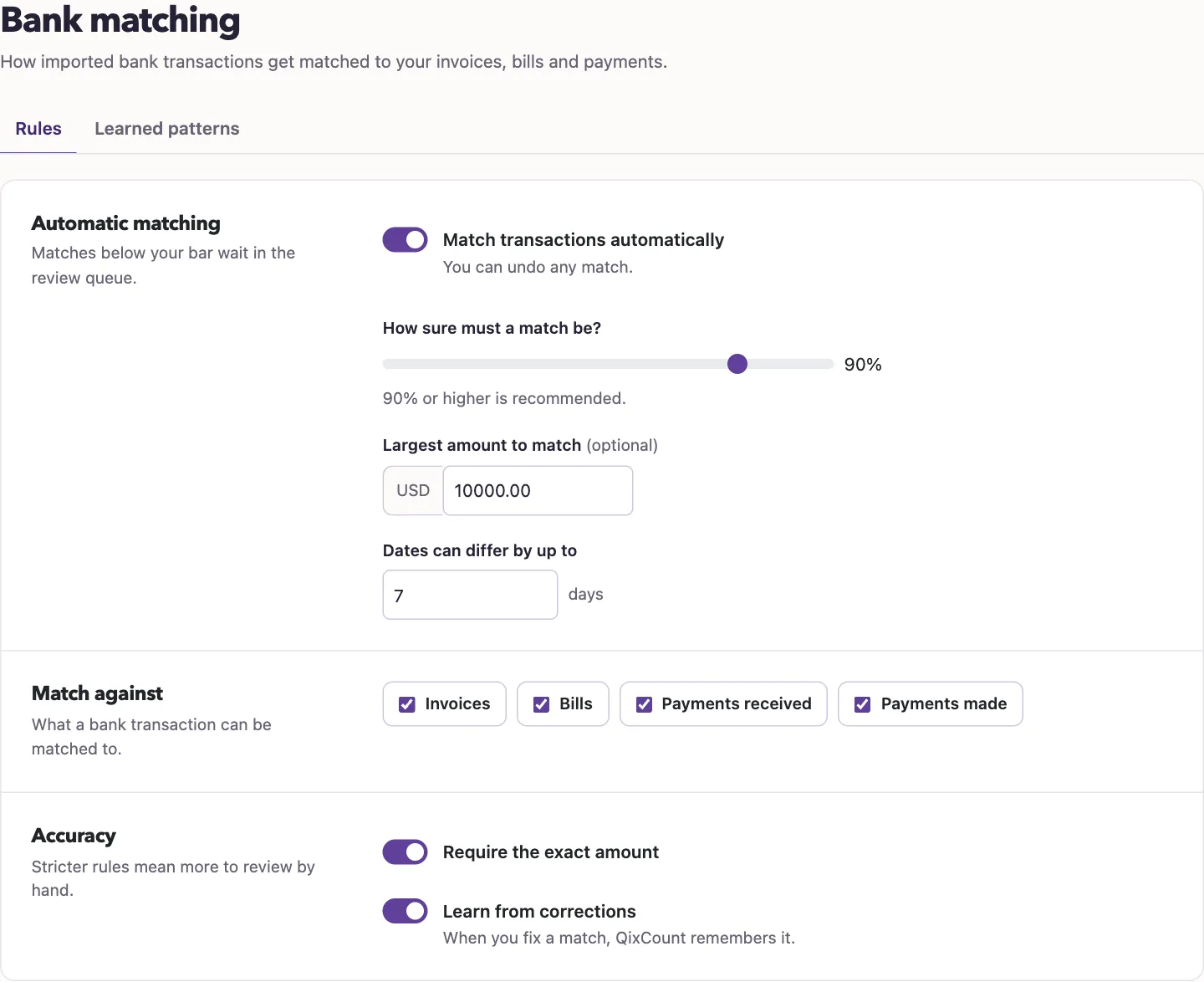
Check each accepted match's date against the original record. Do not rely on Dates can differ by up to to enforce your chosen window. If you need a strict date limit, leave Match transactions automatically off and review matches individually.
If you need learning stopped, contact support; Learn from corrections saves your choice but doesn't stop learning. Records below the matching criteria are sent for review rather than completing reconciliation automatically.
Inspect learned patterns
- Select Learned patterns.
- Review Merchant, Category, Occurrences, Confidence, and Status.
- Select the eye icon to inspect Pattern Details and original merchant-name variations.
A pattern with at least 80% confidence and a category also has an arrow button that turns it into a categorization rule. Rules then apply to newly imported bank transactions.
Manual match acceptance records corrections when learning is available. The table's Auto and Suggest labels describe pattern eligibility; check the actual linked document before relying on a match.
The trash icon deletes a learned pattern after confirmation. It does not delete the bank records or reverse previous matches. The pattern can be learned again from later corrections.
View statistics
With View financial reports and reports enabled, open Reports, then All reports, and select Auto-reconciliation statistics. Auto-reconciled and Auto-reconciled today count automatic matches. Waiting for review and High priority count unresolved flagged records. The learning cards summarize corrections, patterns, applications, and acceptance rate.
Next, review exceptions, check a match, or reconcile a statement.
Good to know
You need Perform reconciliation to change matching settings, inspect learned patterns, or view automatic-matching statistics. Owners have this permission.