
Reconciliation overview
Understand reconciliation statuses, saved progress, approval and locks before comparing an account with its statement.
- Who can do this
- Owners, or people with View reconciliations
- Where
- Banking, then Reconciliation
On this page
Reconciliation compares an account's statement ending balance with the balance calculated from the transactions you select as cleared.
Find or continue a statement
- Choose an Account, Status or Approval filter.
- Select Filter.
- Open a row's three-dot menu.
- Select Continue for unfinished work, or View for a completed reconciliation.
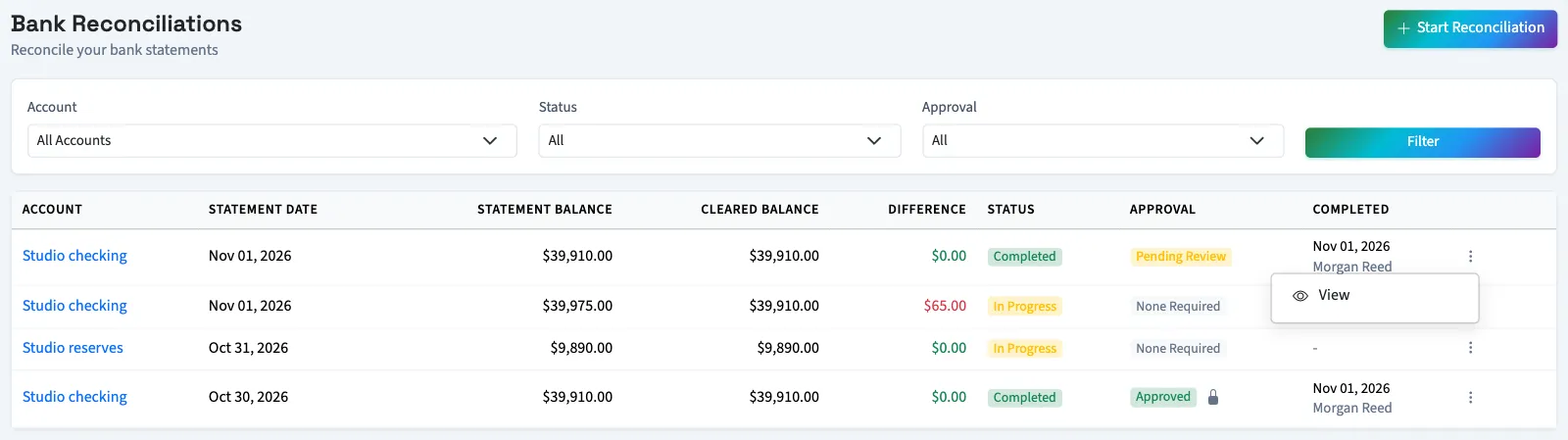
The list shows the statement balance, cleared balance and difference. After changing a cleared selection, wait for the summary to update. Cleared items remain on the clearing screen so you can uncheck them. Balance edits require the checkmark button beside the amount. Starting another reconciliation for an account with work already in progress returns you to that existing work.
Delete unfinished work
An owner or someone with Delete bank transactions can open an unfinished row's three-dot menu, select Delete, and confirm. Completed or locked reconciliations cannot be deleted. This removes the reconciliation from the list; it does not delete the account's bank transactions.
Choose the next task
- Reconcile an account.
- Find a difference.
- Review, approve or lock a reconciliation.
- Unlock or reopen a reconciliation.
- Read reconciliation reports.
- Return to the banking overview.
Good to know
You work on one statement for one account at a time.
Open Banking, then select Reconciliation. Owners and people with View reconciliations can open the list. Starting, completing, approving and deleting use separate permissions.
Understand the statuses
The list separates the reconciliation's progress from its approval status and lock.
| Label | What it means |
|---|---|
| In Progress | You have started the statement and can continue clearing transactions while it is unlocked. |
| Overdue | An unfinished reconciliation has passed its deadline. Completion is blocked only when deadline enforcement is enabled. |
| Completed | The selected transactions have been marked reconciled. Approval may still be pending. |
| None Required | The reconciliation has not entered an approval step. New reconciliations start here. |
| Pending Review | Completion requires a review before final approval. |
| Reviewed | A reviewer has recorded the review; final approval is next. |
| Approved | Approval is finished, or completion did not require a separate review. |
| Locked | Clearing selections, balance changes, deletion and reopening are blocked. Review and approval can still be recorded. |
If review is required for this reconciliation, completing it sets Pending Review. Otherwise completion sets Approved. Automatic locking depends on the business's reconciliation settings.