Review separation of duties
Read permission conflict results and manage a documented exception for a non-owner.
- Who can do this
- Business owners
- Where
- Settings, then People & access
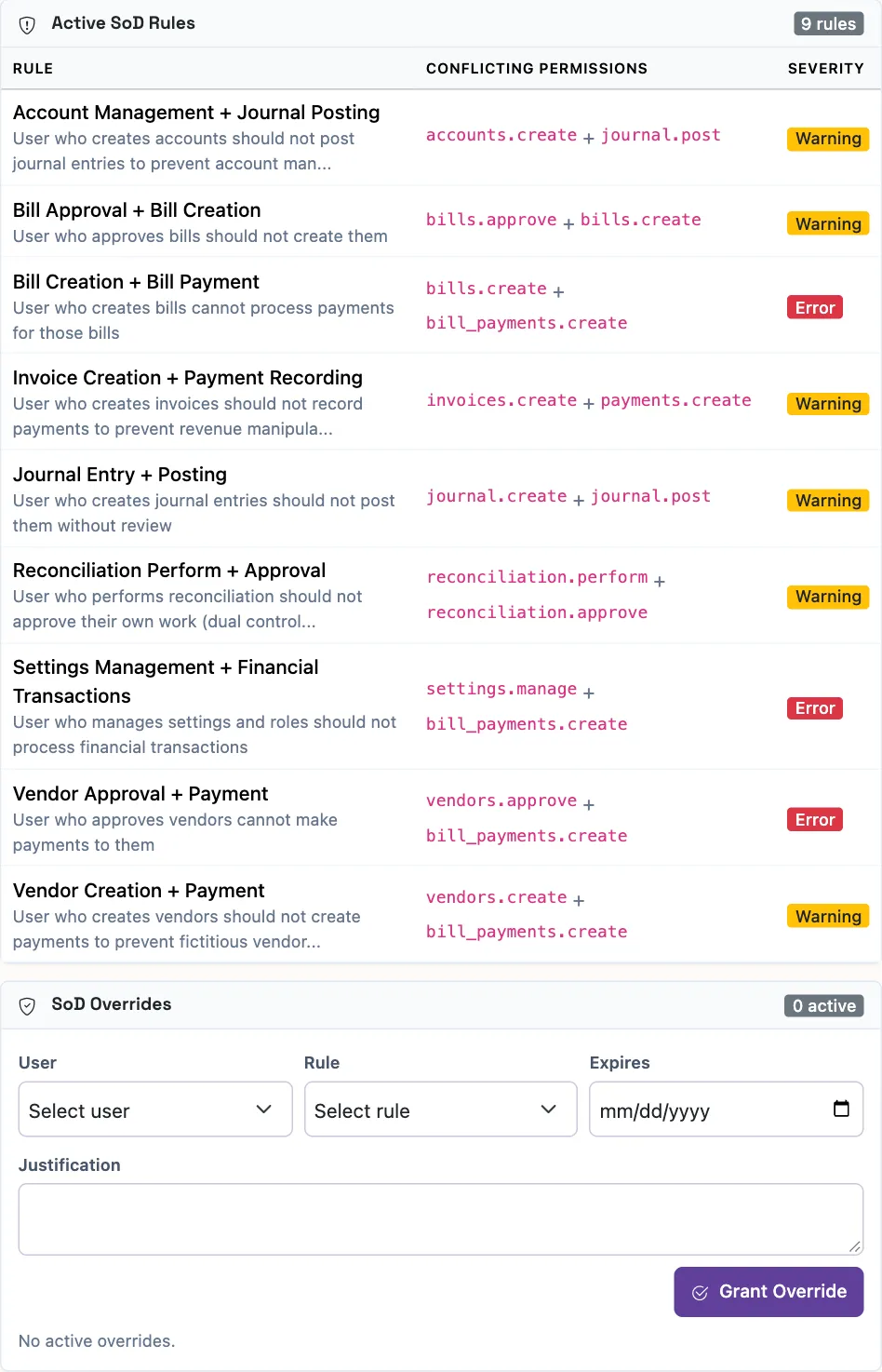
Separation of duties checks compare a person’s permissions with configured pairs of conflicting permissions. QixCount calls this segregation of duties, or SoD, on screen.
Record an exception
- Find SoD Overrides on the Roles page.
- Choose a non-owner in User.
- Choose the Rule.
- Optionally enter an Expires date after today.
- Enter a Justification between 20 and 1,000 characters.
- Select Grant Override.
Only an owner can grant or revoke an exception. QixCount blocks a second active exception for the same person and rule. An exception without an expiry stays valid until revoked.
What happens next
An exception changes how that conflict is evaluated; it does not grant any permissions. Return to roles and permissions to make the intended permission change. Individual permission overrides still need to be saved separately.
Use Revoke beside an active exception to remove it. Revoking or expiring an exception does not automatically remove the person’s permissions, so review the resulting conflict report and access selection.
Good to know
The result describes these checks; it is not an independent assessment of your organization’s controls.
Owners can review the checks in Settings, People & access, Roles. Owners are excluded from conflict results.
Read the results
| On-screen result | Meaning in QixCount |
|---|---|
| Errors in the summary, Violations on a person's row | Permission pairs match an active error-level rule. |
| Warnings | Permission pairs match an active warning-level rule. |
| Compliant | No active rule matches this person's permissions. |
| N/A | The person is an owner and is excluded from the check. |
Active SoD Rules lists the configured conflicting pairs and severity. User Permissions shows each person’s result. Valid exceptions remove that user-and-rule conflict from the result.