
Review the activity log
Filter recorded business activity and see account-level sign-in events for current team members.
- Who can do this
- Business owners
- Where
- Settings, then People & access
Owners can use the activity log to review recorded actions for the current business. It also includes account-level sign-in activity for people who currently belong to the business.
Find activity
- Open Settings, People & access, Activity log.
- Use All Users to choose a person, or leave it unchanged to include everyone.
- Use All Actions to choose an action.
- Use All Types to choose user, security, or system activity.
- Enter a start or end date if needed.
- Select Filter.
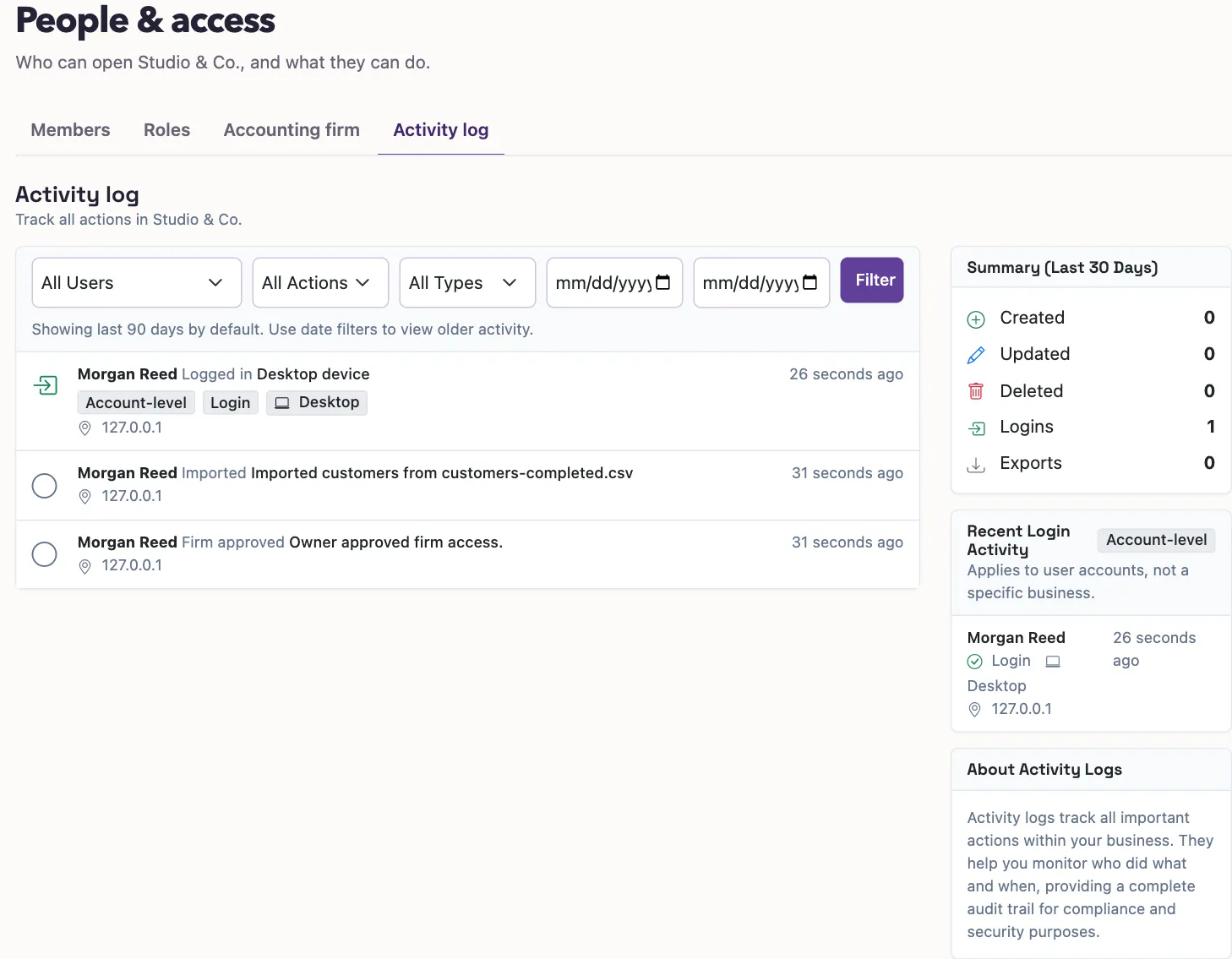
Without a date filter, the list shows the last 90 days. Enter a date range to look for older records. Results appear newest first, with 50 entries per page. The page shows changes to old and new values for supported update events.
Read the side panels
Summary (Last 30 Days) shows counts for its own 30-day window. Changing the list filters does not change those summary counts.
Recent Login Activity shows up to eight recent account-level events for current members. Its date window follows the date filters, but it does not follow the user, action, or type filters. The Account-level badge identifies these events.
What happens next
The log is a view of recorded events; it does not reverse a change. To change access, manage the member or remove a firm connection. To review only your own sign-in records, open login history.
Good to know
An account-level event can relate to signing into QixCount rather than opening this particular business.