
Change or remove a team member
Change a teammate’s access type or role, or remove their access to one business.
- Who can do this
- Business owners
- Where
- Settings, then People & access, then Members
- You'll need
- Another business member; an available user place to change a viewer to an internal user
Owners can change another teammate’s role or remove them from the current business.
Change access
- Open the three-dot menu beside the person.
- Select Edit role.
- Choose Internal teammate or Free viewer (read only).
- For an internal teammate, select an Internal role.
- Select Update Role.
A free viewer receives fixed viewing permissions. A change to internal access needs an available internal place. See user places if QixCount reports that all places are occupied or reserved.
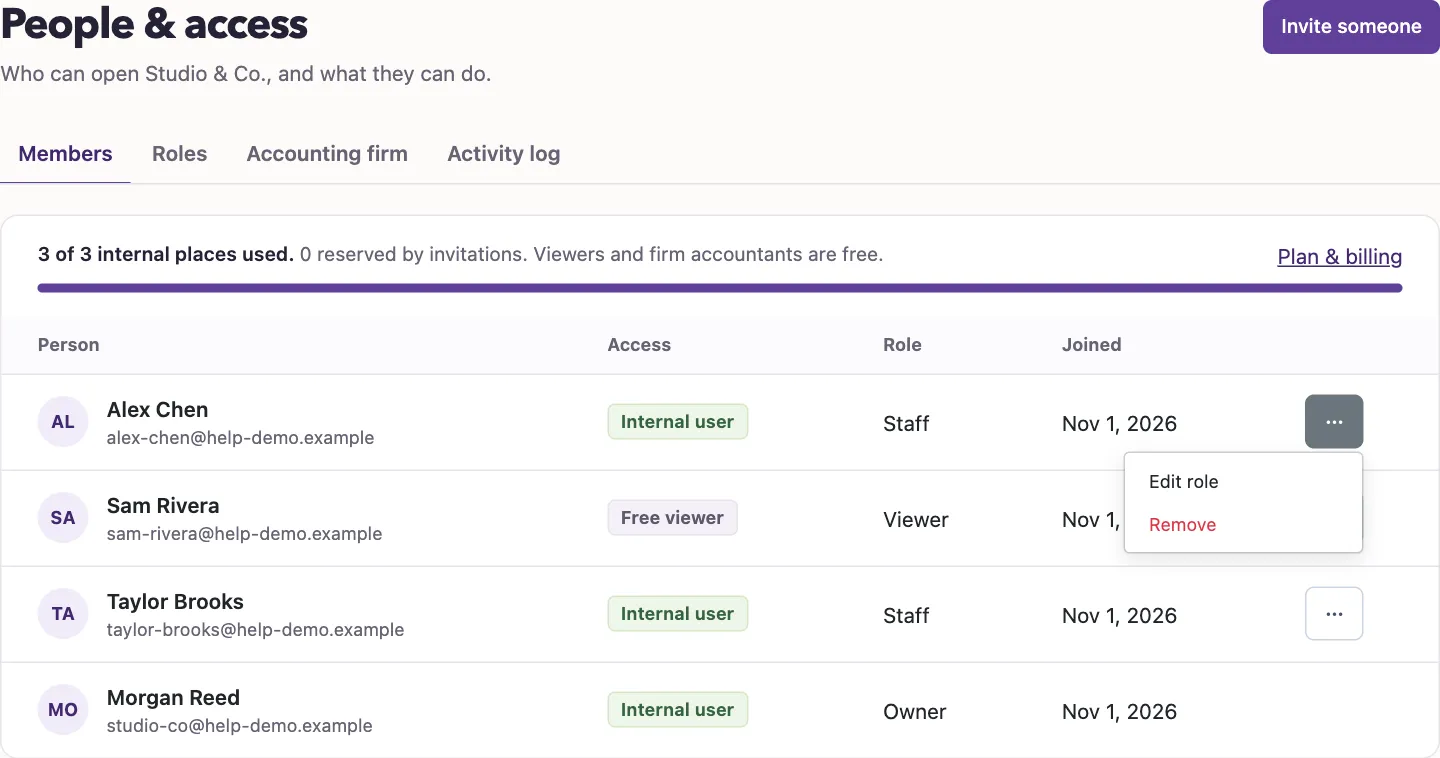
Remove a person
- Open the person’s three-dot menu.
- Select Remove.
- Confirm the removal.
What happens next
The person loses membership in this business and their business user is deactivated. This action does not delete their QixCount account or change memberships in other businesses.
The page does not offer these controls for yourself, owners, or firm accountants. You cannot remove yourself or an owner through team removal. Manage external accountants through the firm connection, rather than through this menu.
Next, check the activity log to review recorded team changes.
Good to know
These controls are in Settings, People & access, Members.