
Post a journal entry
Review a balanced draft and post it to the books with a journal entry number.
- Who can do this
- Owners, or people with Post journal entries and View journal entries
- Where
- Books, then Journal entries
- You'll need
- Advanced accounting turned on in Features; a draft with at least two saved lines, equal debits and credits, and a date open for posting
On this page
Posting moves a draft into the books. Its lines then count toward posted account balances, and QixCount assigns an entry number.
Post the draft
WarningPosting affects the books. You cannot edit or delete the posted entry from the journal screens. Corrections use a separate reversal.
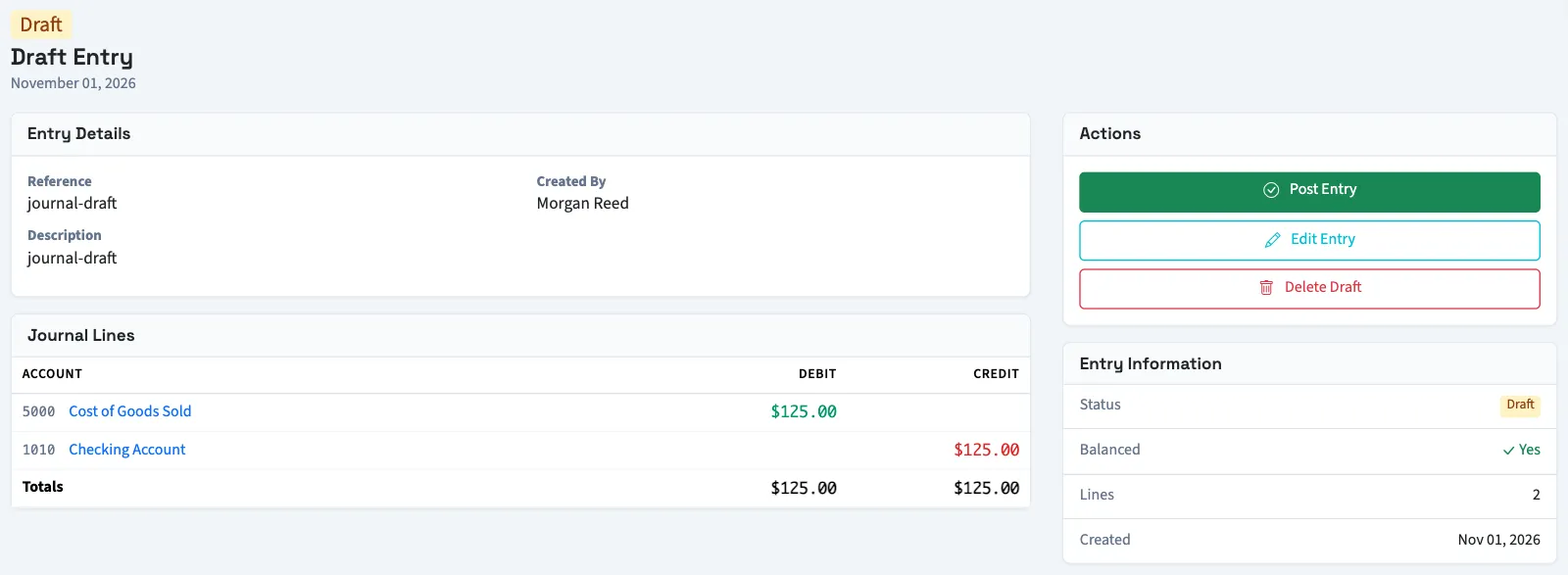
- Open Books, then Journal entries.
- Select the draft's reference or Draft link.
- Review Entry Details and Journal Lines.
- Select Post Entry.
- Confirm the posting.
What happens next
The detail page shows Posted, the entry number, and Posted At. The entry number uses your journal prefix, the year of posting, and a sequence. Its accounting date remains the date you entered.
With View chart of accounts permission, open an account link in Journal Lines to review that account's activity. A posted original may offer Reverse Entry when you need a correction and have permission.
Next, reverse an entry if a posted journal needs correction.
Troubleshooting
If Post Entry is disabled, check the posting blocks. For a Nonprofit draft whose funds are unbalanced, preview and apply interfund offsets if you have access.
Who can do this and what you need
Owners can post. Other active business users need Post journal entries, and View journal entries to open the draft. Assigned accountants from an approved firm have these permissions. Creating a draft and posting it are separate permissions; saving a draft does not submit an approval request from this screen.
If Journal entries isn't in the sidebar, someone with settings access can turn on Advanced accounting in Features.
The draft must have at least two saved lines, equal debits and credits, and a date open for posting. A closed General fiscal year blocks posting even when monthly period rows are absent or open. Reopen the year before posting a correction. The business's backdating limit also applies. Nonprofit requires an accessible active or trial Nonprofit subscription, approved account mappings, an active Operating fund, and valid, balanced fund coding.