
Understand journal entries
Learn when the manual journal form fits your task and what Draft, Posted, and Reversed mean.
- Who can do this
- Owners, or people with View journal entries
- Where
- Books, then Journal entries
- You'll need
- Advanced accounting turned on in Features
On this page
Use the manual journal form when you need to enter accounts, debits, and credits directly. You need to know the accounts and amounts before entering the journal. The form records a date, reference, description, and lines; each line has an account and either a debit or a credit.
Saving creates a draft. Posting is a separate action that adds the entry to posted account balances. A balanced draft alone does not affect those balances.
| Status | What it means |
|---|---|
| Draft | Saved without posting. You can edit or delete it with the relevant permission. |
| Posted | Posted to the books. You cannot edit or delete it from the journal screens. |
| Reversed | The original entry remains, with a separate posted entry that swaps its debits and credits. |
A reversal entry has its own status and a Reversal badge. The original and the reversal link to one another.
Find an entry
Select Books, then Journal entries. Choose Status, From Date, or To Date, or enter part of a reference, description, or entry number in Search. Select Filter. Select Clear to remove the filters.
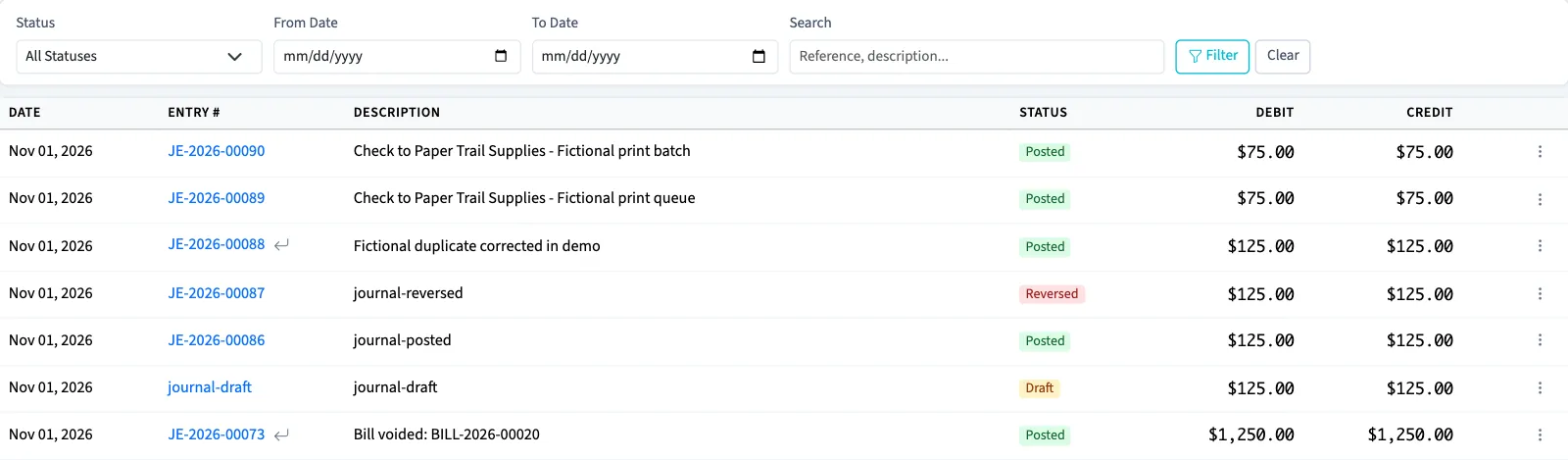
The list includes entries from other workflows as well as manual journals. It shows 20 entries per page, ordered by entry date and then creation time, newest first. Select the entry number or reference to open it.
Check access
Owners have journal permissions. Other active business users need View journal entries to open the list, and separate create, edit, delete, post, or reverse permissions for those actions. Assigned accountants from an approved firm can view, create, edit, and post; standard accountant access does not include deleting or reversing.
If you have journal view access but the menu row is hidden, a user with Manage business settings, roles & permissions permission can enable Advanced accounting in Settings, Features, then select Save changes.
Next, create a journal entry or check why posting is blocked.