
Take card payments on invoices
Enable Stripe payments, email the invoice and check the imported card payment.
- Who can do this
- Owners, or settings access to enable; View invoices and Send invoices to email the payment link
- Where
- Settings, then Invoices, quotes & receipts
- You'll need
- An active Stripe connection allowing charges, invoice emails and online payments enabled, and the customer’s email address
On this page
Add a Stripe card payment link to an invoice email and the customer's online invoice.
Enable invoice card payments
- Open Settings.
- Select Invoices, quotes & receipts.
- Select Payments.
- Turn on Accept online payments.
- Choose Stripe connection.
- Select Save changes.
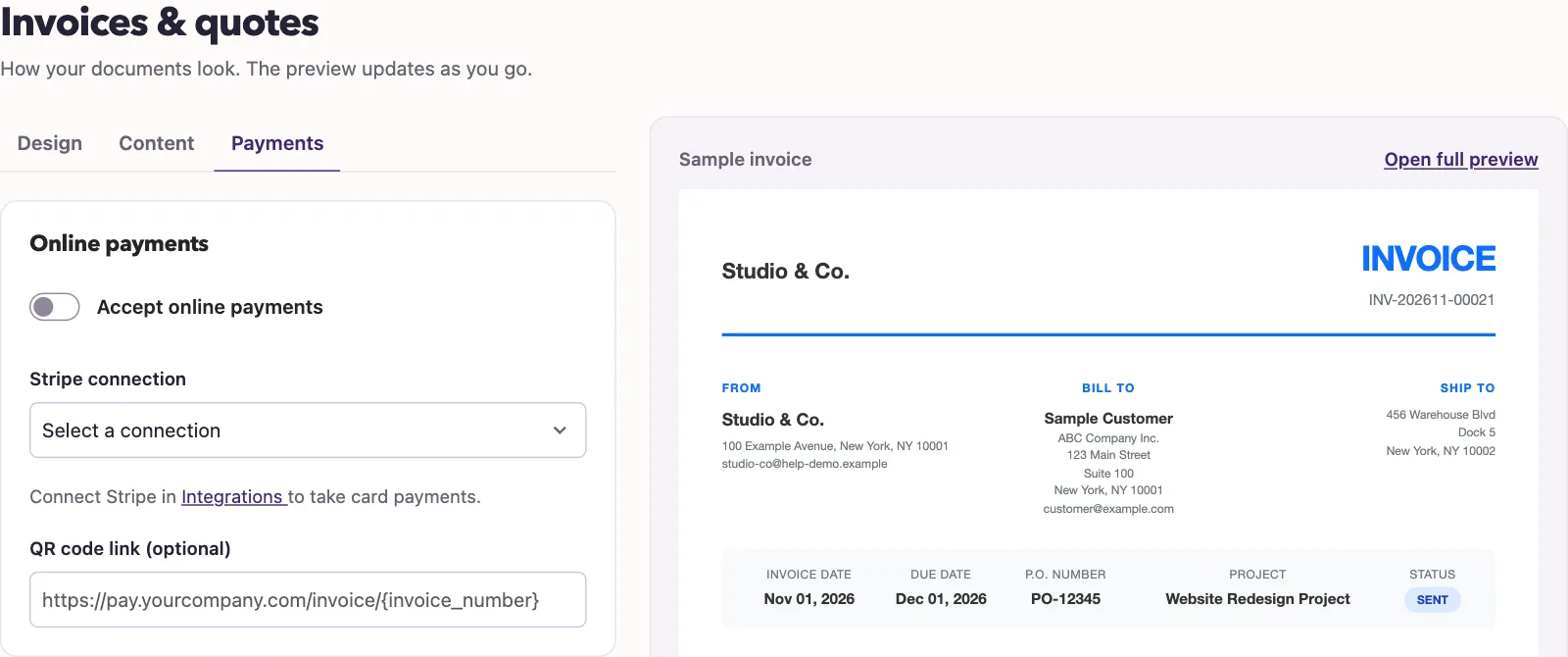
Choose the intended connection explicitly if your business has more than one Stripe account. An invoice with an existing Stripe connection keeps using that connection for its payment link.
Send the payment link
- Open Sales, then Invoices, and select a sent invoice with a balance due.
- Select Email Invoice.
- Select Send Email.
QixCount attempts to create the Stripe payment link before sending the email. Your customer can follow the email's payment link or select Pay Now on the online invoice to open Stripe's card checkout. Paid or void invoices do not display that payment action.
See The public invoice and payment page for the customer's view.
WarningAn old emailed payment link can still open checkout for its original amount after the invoice balance changes or the invoice is paid or voided. For a changed positive balance on an open invoice, send the invoice email again and ask the customer to use the latest email. For a paid or voided invoice, tell the customer not to use earlier payment links and contact support. These actions do not revoke an old checkout.
What happens next
QixCount records the payment when it imports Stripe's successful charge. Returning to the Payment received page alone does not post the payment. Check Stripe activity and the invoice balance before recording any payment manually.
If Pay Now is missing, check the online payment switch, connection and account's ability to take charges. Opening the public invoice does not create a new payment link. A canceled checkout clears the invoice's saved link; send the invoice email again to create another link. If a payment is missing after checkout, sync recent activity and contact support if it still does not appear.
Good to know
The payment link charges the invoice's balance due when the link is created.
Who can do this and what you need
Connect Stripe and review its account mappings. The connection must be active and Stripe must allow charges on that account.
Owners can change the invoice payment settings. Other users need Manage business settings, roles & permissions. Opening the invoice needs View invoices, and sending its email needs Send invoices. The customer needs an email address, and invoice emails must be enabled.