
Find your way around QixCount
Use the sidebar, pinned pages and search to return to the work you need.
- Who can do this
- People with access to the current business
Use the sidebar
- Select a sidebar group to show its pages.
- Select the page you need.
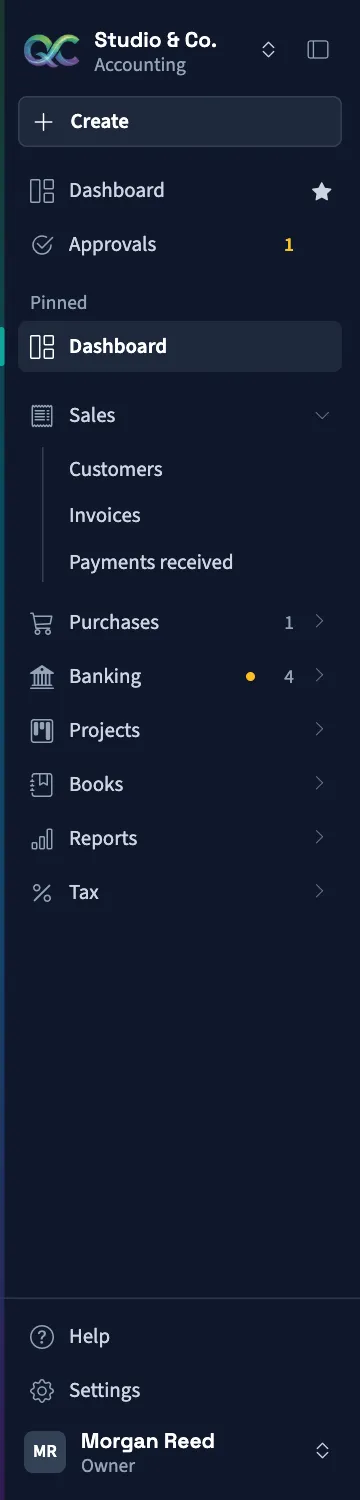
Your sidebar shows pages available for the current business, your permissions and its settings. General and Nonprofit can show different groups. A missing row can mean your role lacks access or the feature is disabled.
Select a group such as Sales, Purchases, Banking or Books to open its pages. Dashboard stays near the top in General. Nonprofit has Overview there instead. Its Nonprofit group stays open and lists Cash gifts, Donors, Grants, Restrictions, Funds, Programs, and Reports when your permissions allow them. The business name at the top opens a menu with Business overview, Team chat when allowed, and Switch business.
On a wide screen, Collapse sidebar reduces it to icons; Expand sidebar restores it. On a smaller screen, open the navigation menu to see the rows. Select Settings near the bottom when you have settings access. Settings has its own navigation and Find a setting search.
Pin a page
- Open the sidebar group containing the page.
- Select the star beside the page.
- Find the page under Pinned.
Select its filled star to unpin it. Pins are saved for that business in the current browser. They can disappear if browser storage is cleared or the page is no longer available to you. Pinning does not grant additional access.
Search pages and records
- Select the header field labeled Search pages and records.
- Enter at least two characters.
- Select a matching page or record.
Pages match by their navigation label. Record search covers customers, vendors, invoices, bills, accounts and journal entries when you can view them. In Nonprofit, it also finds donors by name or email, gifts by donor or reference, and grants by award or grantor name. Projects depend on their settings and your access. Search by a name, document number or relevant reference. Each record category shows up to five matches; narrow the words if you need another result. More results available is a notice rather than a link to a full result list.
Search is limited to the current business. To look in another set of books, switch businesses.
Quick Create offers Cash gift, Grant award, and Donor first in Nonprofit, with the permission for each action.
Sidebar numbers identify work to review, such as pending approvals, unlinked bill uploads, or grants awaiting classification review. The counts load when the page opens and can use data cached for up to a minute. Reopen the page to check for changes. See Keyboard shortcuts for search navigation and Settings overview for settings help.
Select Help Center in the sidebar to open the public guides in a new tab. Older manual links redirect to the closest published guide when a match is available.