
Create a journal entry
Enter a balanced manual journal and save it as a draft before posting.
- Who can do this
- Owners, or people with Create journal entries and View journal entries
- Where
- Books, then Journal entries
- You'll need
- Advanced accounting turned on in Features; active accounts and the debit and credit amounts
On this page
Create a manual journal when you have the accounts and debit and credit amounts ready. Saving creates a draft for review; it does not post to account balances.
Save the draft
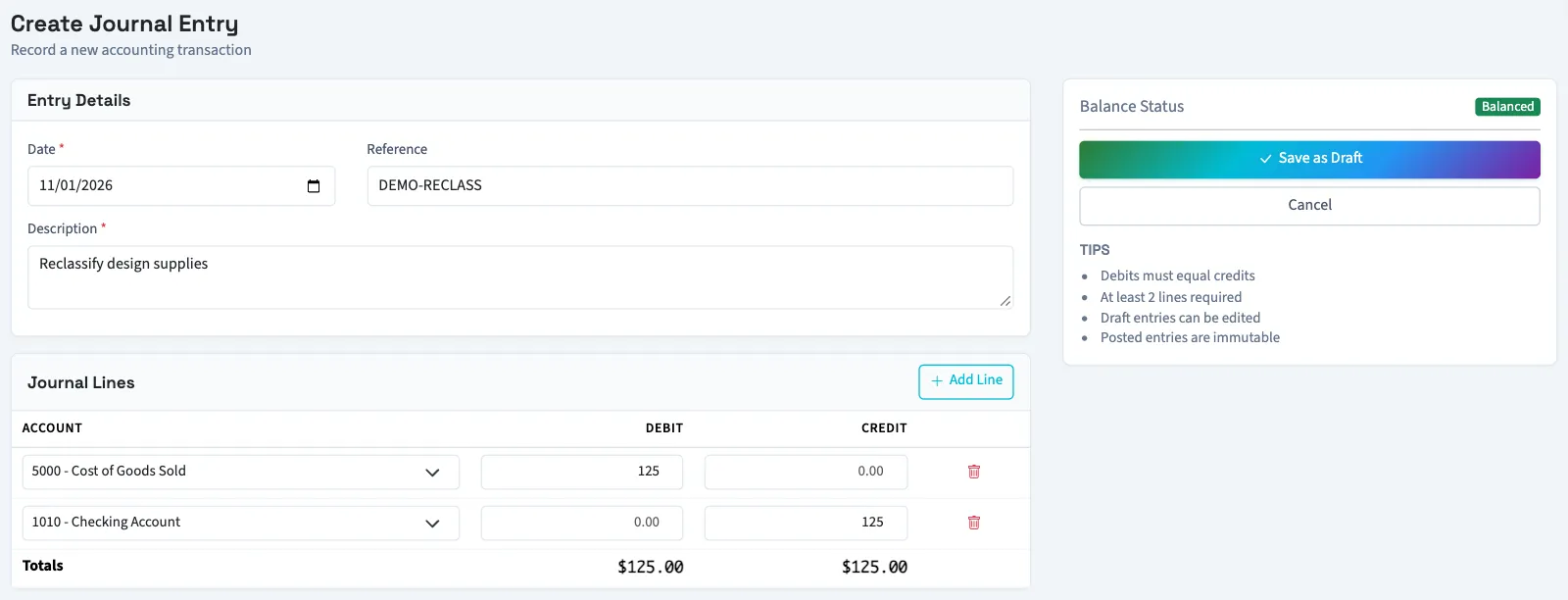
- Open Books, then Journal entries.
- Select New Entry.
- Enter Date. It starts with today's date.
- Enter an optional Reference, up to 100 characters.
- Enter a Description, up to 1,000 characters.
- Select an Account on the first line.
- Enter a nonnegative amount in either Debit or Credit on that line.
- Complete the second line with its account and amount.
- Select Add Line for each additional line you need.
- Check Totals and Balance Status. Total debits must equal total credits.
- Select Save as Draft.
Add Nonprofit coding
Nonprofit shows Financial coding below each account. Review Fund, Program, Grant, Restriction, Net asset class, and Function before saving. The default fund comes from the business's accounting setup. Optional coding can use the reviewed account default where the form offers it.
Archived selections must be reactivated before use. QixCount rejects an expense line using the class with donor restrictions. If different funds do not balance separately, save first and then preview interfund offsets.
What happens next
You return to the journal list. Open the draft to review and post the journal. Zero-amount lines are not saved; posting needs at least two saved lines.
Troubleshooting
An entry cannot be saved with unequal totals or a positive debit and credit on the same line. If saving fails, check and re-enter every account, amount, and coding selection before retrying. After saving, open the draft and check its saved lines before posting.
Who can do this and what you need
Owners can create entries. Other active business users need Create journal entries, plus View journal entries to open the list after saving. The account selector lists active accounts only.
If Journal entries isn't in the sidebar, someone with settings access can turn on Advanced accounting in Features.
In Nonprofit, each line needs an active fund. Expense lines need a function, either selected on the line or supplied by an approved account default.