
Review unpaid vendor bills with AP aging
Group outstanding bill balances by vendor and due date, with the report's date limitations explained.
- Who can do this
- Owners, or people with View financial reports
- Where
- Reports, then AP aging
On this page
Accounts payable (AP) aging groups unpaid bill balances by vendor and due date. You need View financial reports permission, or owner access.
Set the scope
- In General, open Reports. In Nonprofit, use Other reports under Nonprofit, Reports, or the shared Reports group when shown.
- Select AP aging.
- Select Vendor, or leave All Vendors selected.
- Enter As of Date.
- Select Update.
The report includes bills with a positive balance whose current status is pending, partial or overdue. Draft, paid and void bills are excluded. The vendor selector lists active vendors.
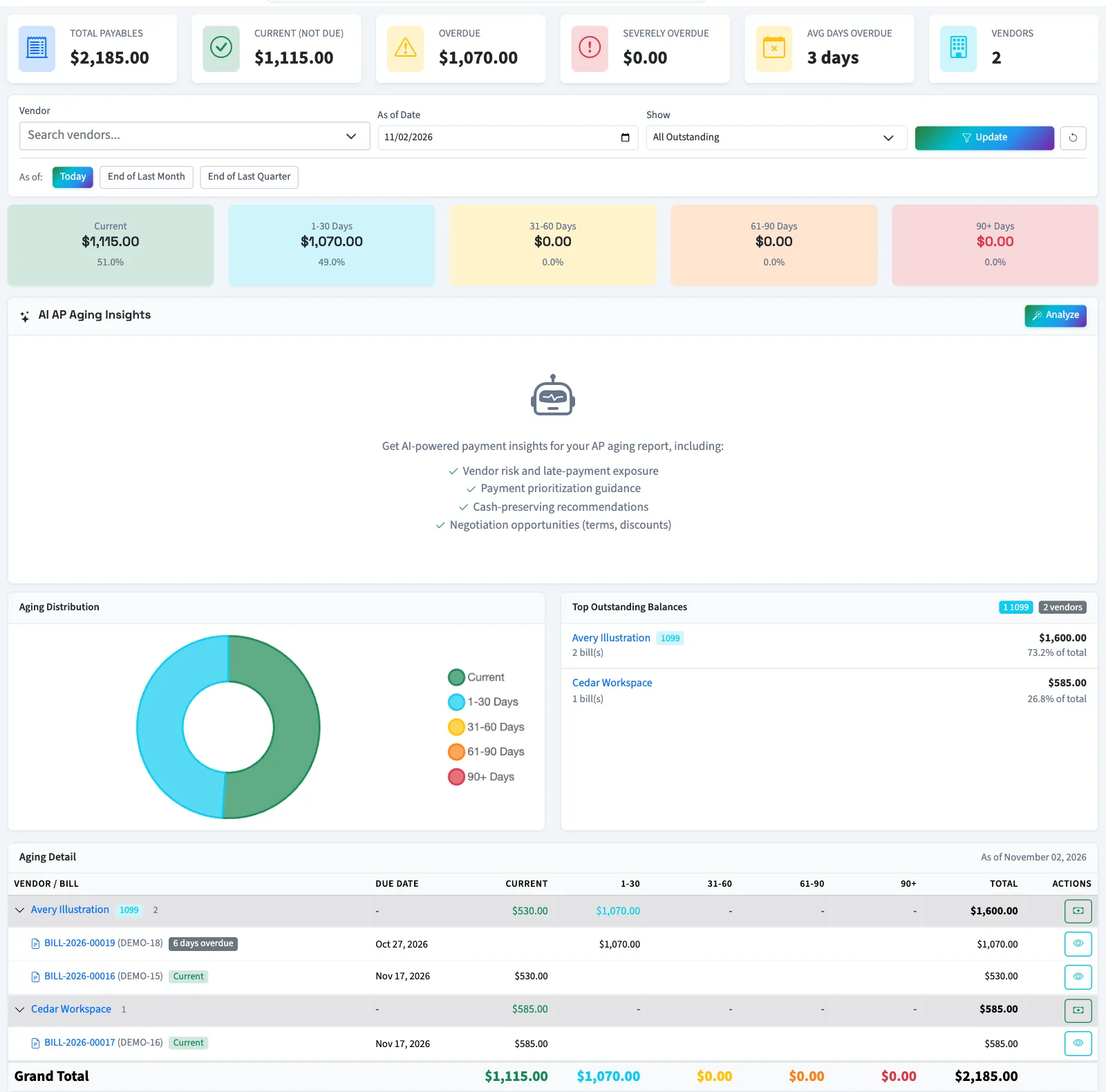
Read the balances
| Column | Meaning relative to the selected date |
|---|---|
| Current | Due on or after that date. |
| 1-30 | Due 1–30 days earlier. |
| 31-60 | Due 31–60 days earlier. |
| 61-90 | Due 61–90 days earlier. |
| 90+ | Due more than 90 days earlier. |
| Total | Remaining bill balances across the buckets. |
Total Payables adds the included balances. Overdue adds all overdue buckets. Severely Overdue adds balances more than 60 days past due. Select a vendor summary row to hide or show its bill detail. Select a bill number to inspect the bill; opening it requires permission to view bills.
Understand the date and control limits
The selected date changes the aging buckets, but the report uses current bill balances and statuses. It does not reconstruct historical unpaid amounts or exclude bills created after that date. A bill paid since an earlier date is absent today.
Use the due date and aging bucket to assess whether a bill is overdue. Select the printer icon to print the report.
What happens next
Select Analyze to request Qix's explanation; analysis is unavailable when no outstanding payables match. A report does not pay bills. To inspect the account entries behind the payable balance, use the general ledger. With no included bills, the page displays No Outstanding Payables.