
Read the cash flow statement
Review cash movements using the direct or indirect method for a selected period.
- Who can do this
- Owners, or people with View financial reports
- Where
- Reports, then Cash flow
The cash flow statement groups changes in recorded cash into operating, investing and financing activities. You need View financial reports permission, or owner access.
Choose dates and a method
- In General, open Reports. In Nonprofit, use Other reports under Nonprofit, Reports, or the shared Reports group when shown.
- Select Cash flow.
- Enter From Date.
- Enter To Date.
- Select Method.
- Select Generate.
The initial range runs from the current fiscal year's start through today. Both boundary dates are included.
Indirect Method starts with the income statement's net income and adjusts it for recorded noncash expenses and changes in current operating assets and liabilities. Direct Method groups posted transactions involving cash accounts by their other account entries.
These methods change the presentation of cash activity. They do not switch your books to cash-basis accounting.
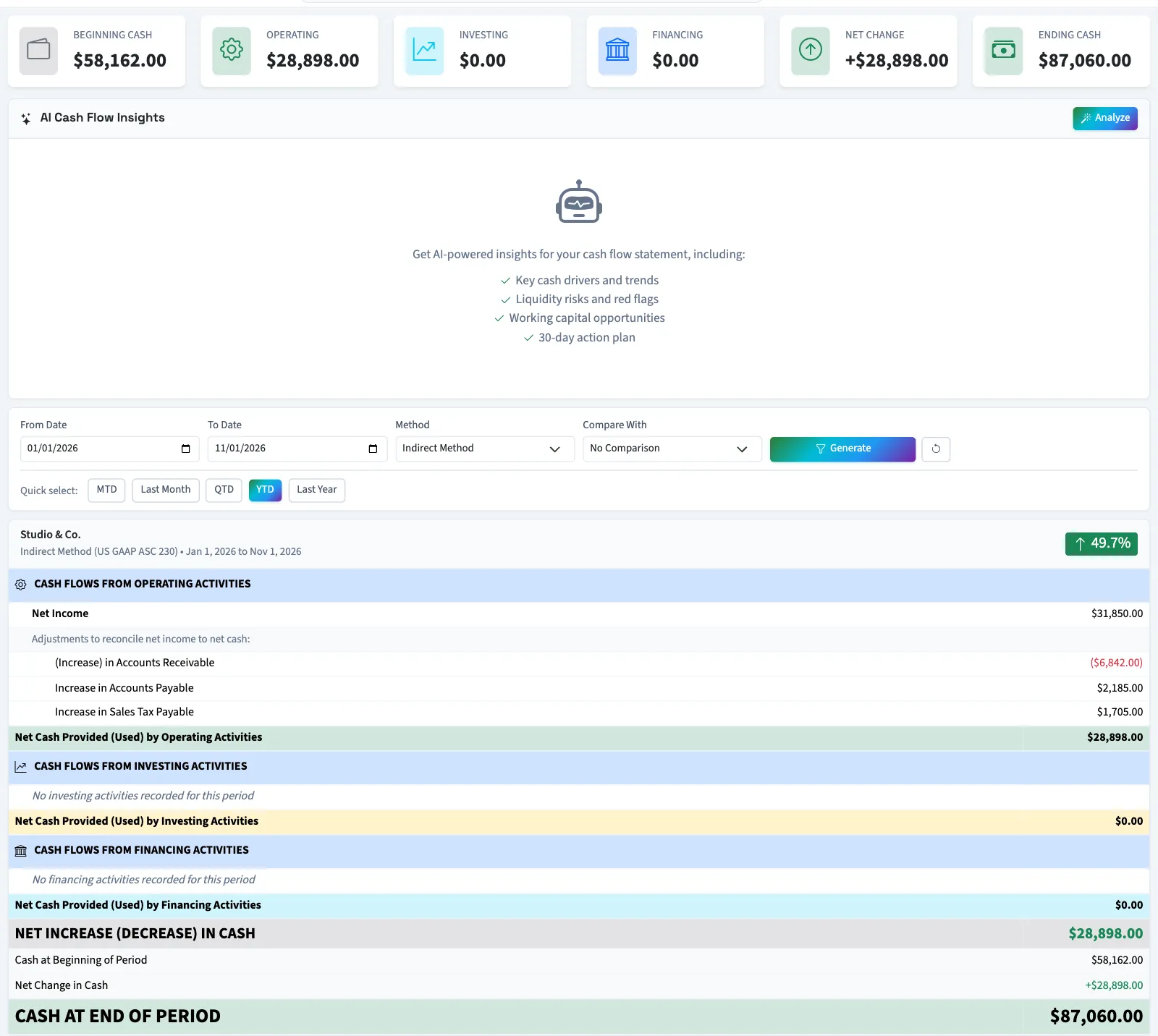
Read the figures
| Label | Meaning in this report |
|---|---|
| Beginning Cash | Selected cash-account balances before the starting date. |
| Operating | Operating cash inflows minus outflows, or net income plus the indirect adjustments. |
| Investing | Cash activity classified to investing accounts, such as non-current assets. |
| Financing | Cash activity classified to financing accounts, such as equity and long-term debt. |
| Net Change | Operating, investing and financing totals added together. |
| Ending Cash | Selected cash-account balances through the ending date. |
General selects asset accounts using cash or bank subtypes and certain account names and codes, including inactive accounts. Nonprofit selects active accounts. The result can differ from a single bank account's balance. Account settings also affect how activity is classified.
When a posted journal combines cash with debit and credit entries in different cash flow sections, those section amounts appear gross: the inflows and outflows are shown separately. Net cash remains correct. A review note counts these journals and names up to five by reference, or by date and description when no reference exists. Use the general ledger to review their classification.
If Reconciliation Difference appears, the recorded ending cash differs from beginning cash plus the calculated change. The report shows this difference; generating it does not adjust the books.
What happens next
Use Compare With to select Previous Period or Same Period Last Year, then generate again. Select Analyze to request Qix's explanation of the displayed scope.
Use the general ledger to inspect the accounts behind an amount, or export and print the statement.