
Review Qix insights and alerts
Open the insights panel, review a suggestion, and dismiss alerts you no longer need.
- Who can do this
- Owners, or people with access to the alert’s records; free viewers cannot dismiss or act on alerts
- You'll need
- Qix’s chat window enabled; access to the records behind each alert
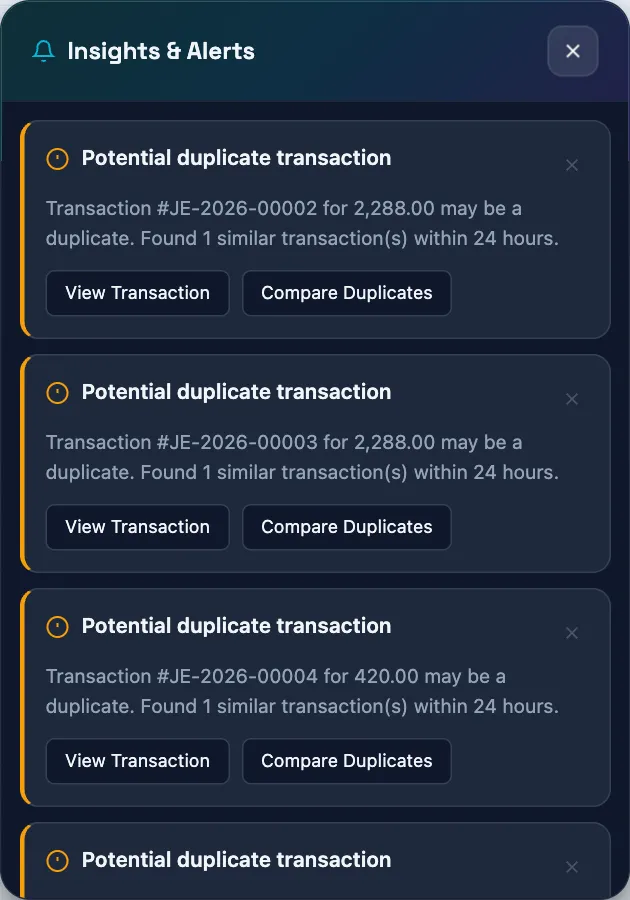
Qix has an insights panel for saved active alerts. Its alert categories cover overdue invoices, cash balances, unusual transactions, and possible duplicates. Treat any displayed alerts as prompts to inspect your records. Owners can see all business-wide alerts.
Review the panel
- Open Qix.
- Select Insights & Alerts, the bell button in the header.
- Read an alert's message and suggested actions.
- Select a question-based suggestion to send its request to Qix, if you want more detail.
- Select Dismiss on an alert you no longer need.
Selecting a suggested action marks the alert as acted upon before the destination or answer completes. That status does not prove a bookkeeping task has finished. Check the underlying record and any result Qix returns.
If the panel is empty
No active insights means the panel has no active results to show. It is not a complete review of your books. If Unable to load insights appears, select Try Again to reload the panel.
Qix can make mistakes. An unusual amount or possible duplicate is a signal for review, not proof of an error. Review any resulting proposal before approving a change.
Next, see What Qix can do and Why Qix may not answer.
Good to know
Other users see only alerts whose underlying data they can view; the critical count follows the same filter. Dismissing or acting on an alert requires that same access.
Overdue invoice alerts need invoice viewing access. Cash shortfall alerts need account and bill viewing access; low cash reserve alerts need account and financial report access. Unusual and duplicate journal alerts need journal and account viewing access.