
Ask Qix a question
Open the assistant, ask about the current business, and check the answer against your records.
- Who can do this
- Owners, internal team members and assigned firm accountants; free viewers cannot send questions
- You'll need
- Qix and its chat window enabled; Nonprofit also needs approved mappings, an active Operating fund and Nonprofit subscription access
Use Qix to ask about invoices, bills, payments, balances, or how to use QixCount. You must be signed in to a business with Accounting access.
Send a question
- Open the business you want to ask about.
- Select Qix AI in the page header. You can also press Control+Q, or Command+Q on a Mac.
- Enter a question in Ask me anything about your finances.... Include the record number, date, or date range when it matters.
- Press Enter to send. Use Shift+Enter for a new line.
- Review the answer against the relevant record or report.
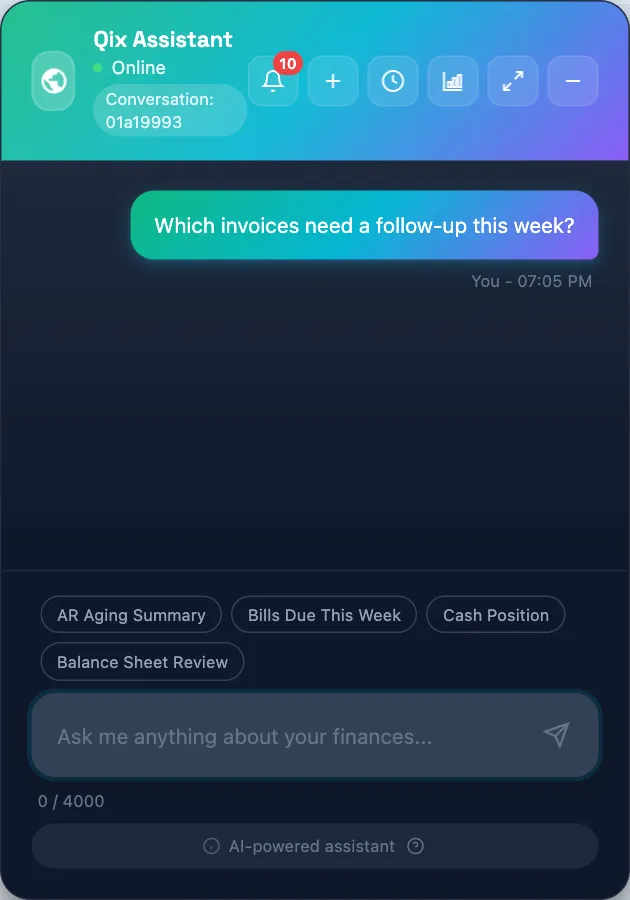
The message limit is 4,000 characters. The widget shows a character count below the question box. Qix receives context about the page you are viewing and checks permissions before direct record lookups and before using its tools.
Continue the conversation
Ask a follow-up in the same conversation to keep the previous discussion available. Select New conversation to start another topic. Select Expand chat if you need more room to read.
Qix can make mistakes. If an answer lacks the record or date you need, ask a more specific question. Review any proposed change before approving it.
Next, learn How Qix finds Help Center instructions or Review your conversations.
Good to know
The chat must also be enabled for the service and your business.