
Check your opening numbers against the old books
Compare account balances at the transition date and confirm Opening Balance Equity ends at zero.
- Who can do this
- Owners, or people with View financial reports
- Where
- Reports, then Trial balance
- You'll need
- The old system’s trial balance for the same transition date
On this page
Compare your imported opening balances with the old system before entering later activity.
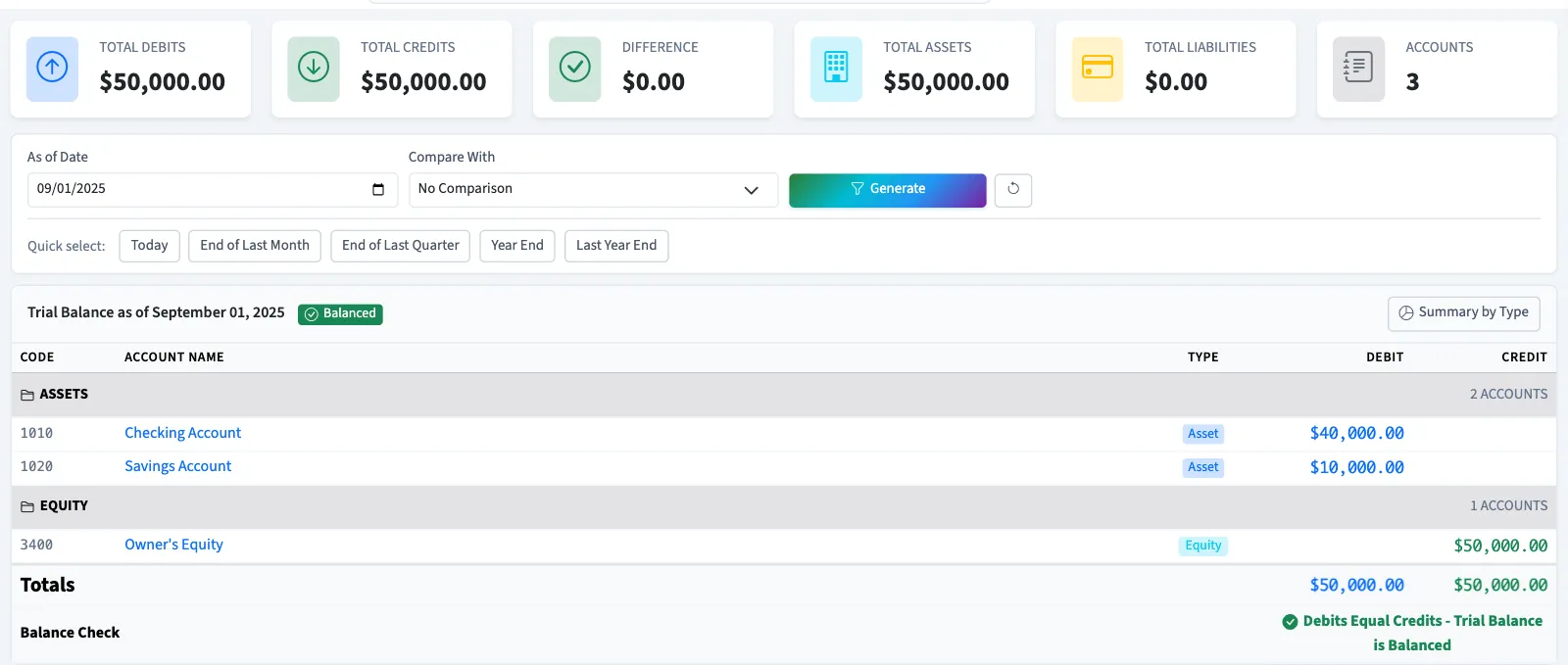
Compare the trial balances
- Open Reports.
- Select Trial balance.
- Enter the transition date in As of Date.
- Select Generate.
- Compare each account's debit or credit balance with the old report.
- Compare Total Debits and Total Credits.
The report includes posted entries through the selected date. General includes inactive accounts with activity. Nonprofit includes active accounts, so keep accounts used for that comparison active. Drafts are excluded. Compare the account rows themselves.
Check Opening Balance Equity
Opening Balance Equity is the temporary account QixCount uses for the other side of imported General opening records. Open invoices, open bills and the remaining opening journal all contribute to it.
- Return to Books, then Import data.
- Check the Opening Balance Equity amount at the top.
- Confirm it is
0.00after all opening records are included. - Also check that account in the trial balance at the transition date.
The import page's amount is its current posted balance, without a transition-date filter. The dated report lets you check the starting point separately.
Resolve a difference
Review skipped duplicates, missing files, account codes and the unpaid amounts imported. Check that receivables and payables were not entered again as opening journal balances. Voiding an imported invoice or bill reverses it today, so reports dated before today still include it, and Opening Balance Equity changes by that amount. Follow undo and replace opening balances when replacing an incorrect opening journal. It reverses on the original as-of date, so the corrected file can use any as-of date. If an older journal was reversed on a date after its own, check that date first; a replacement dated before that reversal is blocked. Review any remaining difference with your accountant instead of adding an unexplained balancing amount.
If old account codes differ, review the account correspondence with your accountant. Open-document imports use QixCount's receivable and payable codes rather than offering a control-account mapping.
Next, inspect the general ledger for a mismatched account or export the trial balance for review.
Good to know
A balanced trial balance means its debit and credit totals agree; it does not prove the accounts or opening amounts match your old books.
Who can do this and what you need
Use the old system's trial balance for the same transition date. Owners can review reports; other users need View financial reports. Returning to Import data requires at least one import permission. Seeing its Opening Balance Equity amount also needs View journal entries.
If the report is hidden, ask an owner or someone with Manage business settings, roles & permissions to open Settings, then Features, and turn on Reports.
For General, finish the open documents and remaining opening balances first. Nonprofit cannot use those ledger imports. Review its opening figures with support after its opening ledger has been planned and entered.